Connect with us

Hi, what are you looking for?

Tools

Best Free Google AI Tools 2026 What actually works

Google has quietly become the most generous AI tool provider on the planet. While OpenAI charges $20/month for ChatGPT Plus and Anthropic prices Claude Pro at the same rate

Best Free Google AI Tools 2026 What actually works

Google has quietly become the most generous AI tool provider on the planet. While OpenAI charges $20/month for ChatGPT Plus and Anthropic prices Claude Pro at the same rate, Google gives away an astonishing amount of AI capability for free. Gemini, NotebookLM, Google AI Studio, Gemini in Gmail, Docs, Sheets—the list keeps growing. But here’s the problem: not all of these tools are created equal, and knowing which ones actually deliver value versus which ones are polished demos requires real testing. I spent weeks using every free Google AI tool available in 2026 with actual work tasks—research, writing, data analysis, meeting preparation, and creative projects. Some of them genuinely changed how I work. Others I deleted from my workflow within days. This guide cuts through the noise and tells you exactly what’s worth your time.

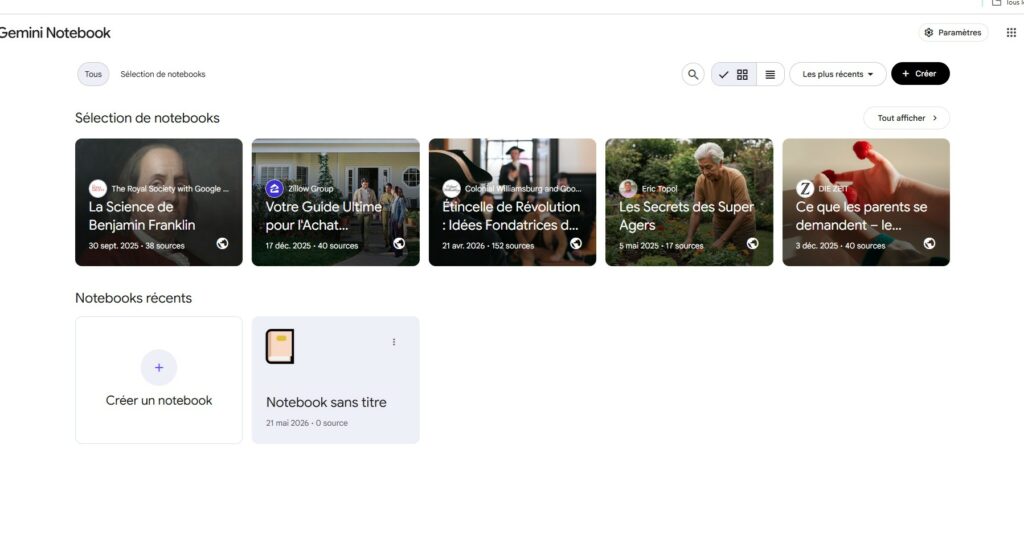
NotebookLM is Google's most underrated AI tool — it lets you upload your own sources and lets AI reason over them with full citations, and it's completely free

Key Takeaways

  • Gemini Advanced is free through Google One AI Premium trial — giving you access to a 2-million-token context window and Deep Research at no cost for the trial period
  • NotebookLM is Google’s most underrated AI tool — it lets you upload your own sources and lets AI reason over them with full citations, and it’s completely free
  • Google AI Studio is a hidden powerhouse — developers and advanced users can access Gemini models with generous free-tier API limits for building custom applications
  • Gemini in Workspace apps is genuinely useful — the AI integration in Gmail, Docs, and Sheets saves real time on everyday tasks for anyone with a Google account
  • Gemini Live is the best free voice AI experience available — real-time conversational AI with screen sharing and camera input, free on most Android devices
  • Google Whisk and Veo are creative tools worth experimenting with — image generation and video creation that punch above their weight for free tools
  • The free tier has real limitations — rate caps, occasional quality gaps versus paid competitors, and features that require a Google One subscription to unlock fully

Why Google Is Giving All This Away

Understanding Google’s strategy helps you use these tools smarter. Google doesn’t make most of its revenue from consumer AI subscriptions. It makes money from advertising, cloud services, and enterprise licensing. Free AI tools serve a dual purpose: they keep users inside the Google ecosystem where they generate data and engagement, and they establish Google as the default AI provider for the next generation of users.

This is why Google can afford to be more generous than OpenAI or Anthropic. Every free Gemini interaction reinforces your dependence on Google’s ecosystem. Every document you create with AI in Google Docs is another reason not to switch to Microsoft Word. Every question you ask NotebookLM instead of ChatGPT is another data point Google uses to improve its models.

The practical result for you: genuinely capable AI tools at no cost. The trade-off is that Google controls the ecosystem, and the free experience is designed to upsell you toward Google One subscriptions and Pixel devices.

Gemini (Free Tier): Your Default AI Assistant

Gemini (Free Tier): Your Default AI Assistant

What it is: Google’s flagship conversational AI, available at gemini.google.com and integrated into Android devices.

What actually works in the free tier:

Gemini’s free tier in 2026 is significantly more capable than it was a year ago. You get access to Gemini 2.5 Flash, which handles most everyday tasks with competence. The interface is clean, responses are fast, and integration with Google Search means it can pull current information without the knowledge cutoff problems that plague other models.

Real-world testing results:

I used Gemini free for a full week as my primary AI assistant. For quick questions, brainstorming, and general research, it performed admirably. The Google Search integration is the real advantage—when you ask about current events, product pricing, or recent developments, Gemini gives you grounded, cited answers that you can verify.

Where it falls short:

The free tier limits you to Gemini 2.5 Flash. For complex reasoning, long-form writing, or nuanced analysis, you’ll notice the quality gap compared to Gemini Advanced or Claude Pro. Rate limits also kick in during heavy use, though they’re generous enough for most casual users.

FeatureFree TierGemini Advanced (Paid)
ModelGemini 2.5 FlashGemini 2.5 Pro
Context Window1M tokens2M tokens
Deep ResearchLimitedFull access
Image GenerationImagen 3 (limited)Imagen 3 (full)
Code ExecutionBasicAdvanced
Price$0$19.99/month (via Google One)

Verdict: Start here if you’re new to AI tools. The free tier covers 80% of what most people need daily.

Gemini Advanced (Free via Google One AI Premium Trial)

What it is: Google’s premium AI tier, bundled with Google One AI Premium. The catch—and it’s a good one—is that Google offers a free trial period.

What you actually get:

During the trial, you have access to Gemini 2.5 Pro, which is genuinely competitive with GPT-4o and Claude Sonnet. The 2-million-token context window means you can upload entire books, codebases, or research libraries and have Gemini reason over all of it. Deep Research lets Gemini conduct multi-step research with you, producing comprehensive reports that would take hours to compile manually.

The Deep Research feature is the standout. I uploaded a 200-page industry report and asked Gemini to identify the three most significant trends and their implications for small businesses. It produced a structured analysis in under five minutes that would have taken me an afternoon. The citations were accurate, the reasoning was sound, and the output was ready to share with minimal editing.

Practical limitations:

The trial period ends. After that, you’re paying $19.99/month. The prompt and upload caps during the trial are lower than the paid tier, though still generous for most use cases. And you need a credit card on file, which auto-renews.

Who should use this immediately: Anyone with a research-heavy workflow who wants to test whether premium AI is worth paying for. The trial gives you enough time to form a genuine opinion.

NotebookLM: Google’s Most Underrated AI Tool

What it is: A research and analysis tool that lets you upload your own sources—documents, PDFs, websites, YouTube videos, audio files—and then converse with an AI that reasons exclusively over that content.

Why this matters more than people realize:

Most AI tools hallucinate. They generate plausible-sounding answers that may or may not reflect reality. NotebookLM eliminates this problem by grounding every response in the sources you provide. When it cites something, you can click through to the exact passage in your original document. It’s the closest thing to a research assistant that actually reads everything you give it.

Real-world workflow I tested:

I uploaded six competitor product pages, three industry reports, and a spreadsheet of customer feedback. Then I asked NotebookLM to synthesize the competitive landscape and identify gaps our product could fill. The output was specific, cited, and directly usable in a strategy document. No hallucinated statistics. No vague generalizations. Just analysis grounded in actual sources.

The Audio Overview feature is remarkable.

NotebookLM can generate a podcast-style audio conversation about your sources. Two AI hosts discuss the material, ask each other questions, and surface insights you might have missed. It sounds natural—not robotic—and it’s genuinely useful for reviewing material while commuting or exercising.

What NotebookLM Does WellWhat It Doesn’t Do
Source-grounded researchGeneral knowledge questions
Document analysis and synthesisReal-time web search
Audio overview generationImage or video analysis
Citation trackingLarge-scale data processing
Multi-source comparisonCreative writing

Limitations:

NotebookLM only works with the sources you provide. It can’t search the web for additional context. It’s a research tool, not a general assistant. You need to bring your own material for it to be useful.

Who needs this: Researchers, students, analysts, consultants, and anyone who works with large volumes of documents and needs to extract insights efficiently.

Google AI Studio: The Developer’s Hidden Gem

Google AI Studio: The Developer's Hidden Gem

What it is: A free development environment for building applications powered by Gemini models, with generous free-tier API access.

What makes it significant:

Google AI Studio lets you experiment with Gemini models through a no-code interface, test prompts, compare model outputs, and generate API keys for integration into your own applications. The free tier provides enough capacity for prototyping, learning, and small-scale deployment.

Who should care about this:

If you’ve ever wanted to build a custom AI-powered tool—a chatbot for your business, an automated document processor, a specialized research assistant—Google AI Studio is where you start. The prompt playground lets you iterate quickly without writing code, and the pricing for API calls beyond the free tier is competitive.

The no-code prompt testing is the real value for non-developers.

Even if you never build an application, Google AI Studio’s interface lets you compare different Gemini models side-by-side, test system prompts, and understand how parameter adjustments affect output quality. It’s the best free environment for learning how AI models actually work under the hood.

Limitations:

The free tier has rate limits that restrict heavy usage. The interface assumes some technical comfort, though it’s far more accessible than traditional coding environments. And you need a Google account with billing enabled, even for the free tier.

Gemini in Google Workspace: AI Where You Already Work

What it is: AI assistance built directly into Gmail, Google Docs, Google Sheets, Google Slides, and Google Meet—available to anyone with a Google account.

Gmail:

Gemini in Gmail can draft emails, summarize long threads, suggest replies, and extract action items from conversations. The “Help me write” feature generates contextual drafts based on your prompt and the email thread. In testing, the drafts were roughly 70% ready to send—requiring personalization and fact-checking but saving significant drafting time.

Google Docs:

“Help me write” in Docs generates first drafts, outlines, and structured content from prompts. The quality is solid for business writing—proposals, reports, summaries. It’s less effective for creative or highly specialized content. The real value is in brainstorming and structure: asking Gemini to generate an outline for a report and then filling in the sections yourself is faster than starting from a blank page.

Google Sheets:

This is where Gemini in Workspace shines brightest. The AI can generate formulas from natural language descriptions, create pivot tables, build charts, and analyze data patterns. If you’ve ever spent twenty minutes Googling how to write a VLOOKUP formula, Gemini in Sheets eliminates that entirely. Describe what you want in plain English, and it generates the formula.

Google Meet:

Gemini in Meet provides real-time meeting summaries, action item extraction, and follow-up email drafting. For anyone who attends multiple meetings daily, this alone saves significant time.

The honest assessment:

Workspace AI is best for incremental efficiency gains on tasks you’re already doing. It won’t transform your workflow, but it will shave minutes off dozens of small tasks throughout your day. Over a month, those minutes compound meaningfully.

Gemini Live: The Best Free Voice AI

What it is: A real-time conversational AI mode that lets you talk to Gemini naturally, share your screen or camera, and receive instant responses—available free on most Android devices and through the Gemini app.

What makes it exceptional:

Gemini Live handles interruptions naturally, maintains conversation context across minutes of dialogue, and responds with minimal latency. The camera and screen sharing features let you show Gemini what you’re looking at and get real-time analysis. I used it to troubleshoot a software configuration by sharing my screen and asking Gemini to walk me through each step. The experience felt like talking to a knowledgeable colleague, not interacting with a chatbot.

Practical use cases that worked well:

Brainstorming ideas while walking—the voice interface means you can think out loud and get immediate feedback without staring at a screen. Real-time translation during a conversation with a non-English speaker. Analyzing a document by pointing your camera at it and asking questions about the content. Getting step-by-step cooking instructions while your hands are occupied.

Limitations:

Requires an Android device or the Gemini app, which has limited availability on iOS. The voice mode consumes more battery than text-based interaction. And the quality of responses depends heavily on your speaking clarity and background noise.

Google Whisk and Veo: Creative AI Tools

Google Whisk lets you combine images as visual prompts to generate new images. Upload a photo of a room, a style reference, and an object, and Whisk generates a new image that blends all three inputs. It’s not as precise as Midjourney or DALL-E for specific compositions, but for rapid visual brainstorming and mood board creation, it’s surprisingly capable and completely free.

Veo 2 is Google’s video generation model, accessible through Google AI Studio and experimental platforms. It generates short video clips from text prompts. The quality has improved dramatically—realistic motion, coherent physics, and consistent style. For marketers, content creators, and anyone who needs quick video concepts without production budgets, Veo is worth experimenting with.

The honest caveat:

Both tools are experimental. Outputs are inconsistent. You’ll generate ten mediocre results for every impressive one. They’re best treated as creative starting points rather than finished products.

What We Liked / What Could Be Better

What We Liked

  • Generosity of free tiers. Google provides more free AI capability than any other company. The combination of Gemini free, NotebookLM, AI Studio, and Workspace AI covers most daily needs without spending a dollar.
  • Source grounding in NotebookLM. The ability to upload your own documents and get cited, accurate responses is a genuine differentiator. No other free tool does this as well.
  • Deep Research in the trial period. The multi-step research capability produces comprehensive, well-structured reports that save real hours.
  • Workspace integration. AI embedded in tools you already use eliminates the friction of switching between applications.
  • Gemini Live’s conversational quality. The voice AI experience feels natural and genuinely useful for hands-free scenarios.
  • Google AI Studio for learning. Even if you never build an application, the prompt playground teaches you how AI models work in an accessible, free environment.

What Could Be Better

  • Rate limits are inconsistent. Free-tier limits vary by feature and sometimes change without notice. Heavy users will hit walls at unpredictable times.
  • Quality gap between Flash and Pro. The free tier’s Gemini 2.5 Flash is capable but noticeably less sophisticated than Gemini 2.5 Pro for complex reasoning and nuanced writing.
  • Ecosystem lock-in. The best features require a Google account and, increasingly, a Google One subscription. You’re trading data and loyalty for free tools.
  • NotebookLM’s web limitation. The inability to search the web within NotebookLM limits its usefulness for research that requires current external information.
  • Experimental status of creative tools. Whisk and Veo are impressive but inconsistent. Relying on them for production work is premature.
  • Privacy considerations. Free tools are funded by data. Google’s privacy policy permits using your interactions to improve its services. If data privacy is a priority, the free tier’s cost isn’t zero.

Who Is It Suitable For? And Who Is It Not Suitable For?

Best suited for:

  • Students and researchers who need source-grounded analysis, document synthesis, and citation tracking. NotebookLM alone justifies Google’s ecosystem.
  • Small business owners and freelancers who want AI assistance without subscription costs. The Workspace integration handles emails, spreadsheets, and documents efficiently.
  • Content creators experimenting with AI-generated visuals and video. Whisk and Veo offer free creative exploration.
  • Professionals already embedded in Google’s ecosystem. If you use Gmail, Docs, and Sheets daily, the Workspace AI features integrate seamlessly into existing workflows.
  • Anyone evaluating whether to pay for AI. Google’s free tools provide a comprehensive testing ground for understanding what AI can actually do for your work.

Not ideal for:

  • Power users who need the best model available. Gemini 2.5 Flash is good, not great. For tasks requiring the highest reasoning quality, Claude Pro or GPT-4o remain superior.
  • Privacy-sensitive users. If protecting your data from corporate use is a priority, free Google tools carry inherent trade-offs.
  • Windows-centric workflows. Many of Google’s best AI features work best within its own ecosystem. Microsoft Copilot may serve you better if your tools are primarily Office-based.
  • Developers who need high API volume. Google AI Studio’s free tier is generous for prototyping but insufficient for production workloads.
  • Anyone expecting perfect outputs. Every free tool on this list requires human judgment, fact-checking, and editing. None of them replace expertise.

Alternatives and Comparisons

If Google’s free tools don’t cover your needs, these alternatives are worth evaluating:

For general AI assistance: ChatGPT’s free tier remains strong for conversational AI and quick tasks. Claude’s free tier handles longer documents better than Gemini Flash. Both have more limited free offerings than Google but arguably produce higher-quality outputs for complex reasoning.

For research and analysis: Perplexity’s free tier provides source-cited web research that outperforms Gemini for real-time information gathering. For document analysis, Claude’s free tier handles large uploads competently, though with smaller context windows than Gemini Advanced.

For creative work: Midjourney and DALL-E still produce more consistent image results than Google Whisk, though they require paid subscriptions. Runway offers more advanced video generation than Veo, also behind a paywall.

For workspace productivity: Microsoft Copilot integrates with Office 365 and may serve you better if your team uses Word, Excel, and Outlook. Notion AI is superior for teams whose documentation lives in Notion.

For developers: OpenAI’s API and Anthropic’s API offer more mature developer ecosystems than Google AI Studio, though Google’s pricing is competitive and the free tier is more generous.

Frequently Asked Questions

Is Google AI really free?

Yes, with caveats. Gemini, NotebookLM, Google AI Studio, and Workspace AI features are all available at no cost. Some features are limited compared to paid tiers, and Google’s premium Gemini Advanced requires a Google One subscription after the trial period. The free tools are genuinely functional—they’re not demos or trials that expire.

How does Gemini free compare to ChatGPT free?

Gemini free offers better web grounding through Google Search integration, a larger context window, and seamless integration with Google Workspace. ChatGPT free offers better reasoning quality, a more polished interface, and broader third-party plugin support. For most everyday tasks, the difference is marginal. For complex analysis, ChatGPT’s free tier edges ahead. For Google ecosystem users, Gemini is the clear winner.

Can I use NotebookLM for commercial research?

Yes. NotebookLM processes your uploaded documents and provides analysis. You retain ownership of your content. However, review Google’s terms of service regarding how your data is used for model improvement, particularly if your research involves sensitive business information.

What happens when the Gemini Advanced trial ends?

You lose access to Gemini 2.5 Pro, Deep Research, and other premium features. Your notebooks, documents, and other Google data remain intact. You can continue using Gemini’s free tier without interruption.

Are Google’s AI tools safe for sensitive documents?

Google states that data from Workspace AI features is not reviewed by humans and is not used to train AI models for Workspace customers. However, free-tier usage may be subject to different data handling practices. For highly sensitive documents, review Google’s current privacy policy and consider whether the free tier’s data practices align with your requirements.

Which Google AI tool should I learn first?

Start with Gemini at gemini.google.com for general AI assistance. Then explore NotebookLM if you work with documents and research. Add Workspace AI features to your existing Google apps for incremental efficiency. Only explore AI Studio if you’re interested in building custom applications.

Conclusion: A Use-Case Recommendation

There is no single “best” free Google AI tool. The right choice depends entirely on what you need to accomplish.

If you need a general AI assistant for daily questions, brainstorming, and quick research: Use Gemini’s free tier. It’s fast, well-integrated with Google Search, and handles 80% of everyday AI tasks competently.

If you work with large volumes of documents and need accurate, cited analysis: NotebookLM is your highest-value tool. Upload your sources, ask questions, and get answers grounded in actual material. Nothing else in Google’s free lineup matches it for this purpose.

If you want AI embedded in your existing workflow without switching apps: Use the Workspace AI features in Gmail, Docs, and Sheets. The efficiency gains are incremental but real, and they compound over time.

If you’re evaluating whether to pay for AI tools: Take the Gemini Advanced trial. Use Deep Research, test the 2-million-token context window, and compare the output quality against what you get from free tools. After the trial, you’ll have the data to decide whether the $20/month is justified for your specific needs.

If you’re a developer or technical user: Start with Google AI Studio. The free-tier API access and prompt playground provide the best free environment for learning and prototyping with modern AI models.

The common thread across all these recommendations is this: start with one tool, use it for a real task, and evaluate the results. Google’s free AI ecosystem is vast, but your time is finite. Pick the tool that solves your most pressing problem today, master it, and expand from there.

You May Also Like