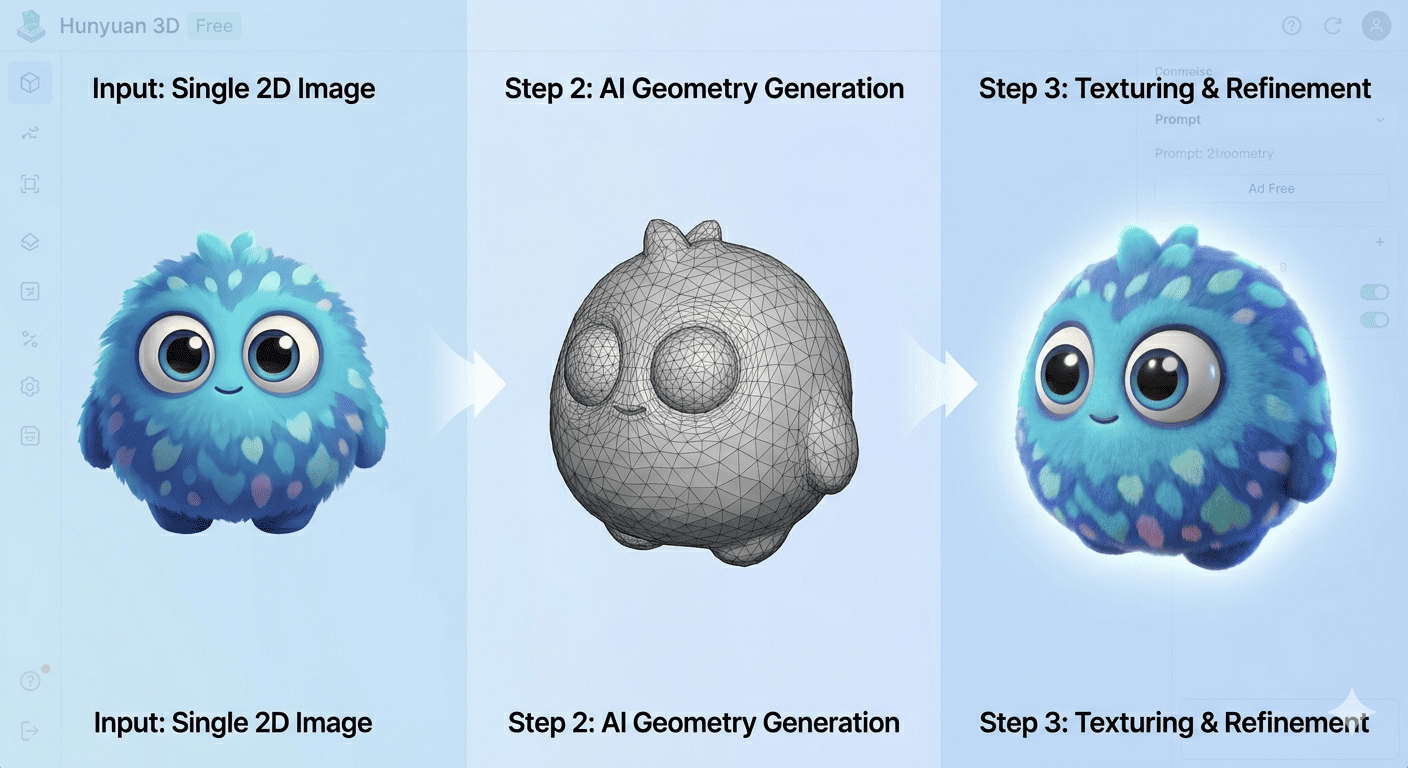
Yes, Hunyuan 3D is genuinely free — both as an open-source model you can run yourself and through free online services that cost nothing to use. But the “free” experience varies a lot depending on which path you take. This article breaks down every way to use Hunyuan 3D at no cost, explains the limits you should know about, and helps you decide if it’s the right AI 3D tool for your workflow.
What Is Hunyuan 3D Exactly?
Hunyuan 3D is an AI model developed by Tencent that turns images or text descriptions into fully textured 3D models. It was first released as an open-source project in late 2024, and Tencent has been updating it regularly ever since. The current version as of mid-2026 is 3.5, which supports up to 8K PBR textures and generates results in under 60 seconds.
Tencent’s Entry into AI 3D Generation
Tencent is a name most people know from gaming and messaging, but the company has been investing heavily in generative AI. Hunyuan 3D is part of a broader family that includes their text and image generation models. What sets Hunyuan 3D apart is that Tencent open-sourced the model weights and training code — something most competitors have not done. The model has been downloaded over 3 million times on Hugging Face and is used by companies like Unity China and Bambu Lab.
If you want a broader picture of Tencent’s AI play, our article on Tencent vs Alibaba vs Baidu covers how the company stacks against its Chinese rivals.
How the Technology Works (in Plain English)
You give Hunyuan 3D an image or a text prompt. The AI first builds a rough 3D shape (geometry), then paints a detailed texture on top. This two-stage approach — shape first, texture second — is why the results look better than older single-pass models. The latest version uses a “rough-to-fine” strategy that starts with the big structure and refines the small details.
I have tested this myself with product photos and character sketches. The geometry is not perfect every time — thin parts like sword blades or hair strands sometimes come out blobby. But for a free tool, the results are frankly impressive.
Is Hunyuan 3D Really Free? Breaking Down the Options
“Free” means different things depending on where you use Hunyuan 3D. Here are the three main routes.
The Official Tencent Hunyuan 3D Engine (20 Free Generations/Day)
Tencent runs an official website at 3d.hunyuanglobal.com (international version). You get 20 free generations per day after creating an account. That is enough for most personal projects and experiments.
Enterprise users can also access the Hunyuan 3D API through Tencent Cloud and receive 200 free credits to start. After that, pricing depends on usage volume.
The global version launched in November 2025 — you can read Tencent’s official announcement here.
Third-Party Community Sites (Unlimited, No Signup)
Several independent sites have set up free Hunyuan 3D generators. Hy3D.dev is one example — you upload an image and download the GLB file without creating an account. No watermarks, no hidden limits.
These third-party services are community projects running the open-source model on their own servers. They are a great way to test Hunyuan 3D without committing to anything. The downside is that you are relying on their infrastructure, so generation might be slower during peak hours.
Self-Hosting the Open-Source Model (Completely Free, Needs Hardware)
This is the most powerful option. The Hunyuan3D model weights are available on GitHub and Hugging Face under the Apache 2.0 license. You can run the model on your own machine with no usage limits whatsoever.
The hardware requirement is real, though. You need at least 10GB of VRAM for shape generation and 21GB for texture generation (29GB total for both). An RTX 3090 or 4090 works well. There are also community ports for ComfyUI and Windows portable versions that make local setup easier.
I run the 2.1 version locally on an RTX 4090, and generation takes about 30-45 seconds per model. The 3.0 and 3.5 versions are heavier and slower but produce noticeably better textures.
What Can You Actually Create with Hunyuan 3D?
Image-to-3D Workflow
This is the most popular use case. You upload a photo of an object — a product, a character, a piece of furniture — and Hunyuan 3D generates a 3D model that matches. The AI handles both the geometry and the surface texture.
Best results come from images with:
- Clean backgrounds (white or removed)
- Good lighting that shows the object’s full shape
- Front-facing or isometric views
I tested it with a photo of a leather chair. The model captured the general shape and the leather texture surprisingly well. The back side was less accurate — single-image 3D has always struggled with occluded areas — but it was usable for an e-commerce product viewer.
Text-to-3D Workflow
You can also describe a 3D model in text and Hunyuan 3D will generate it. This works better for simple, common objects than for unusual or abstract concepts. Prompts like “a medieval stone castle tower with moss-covered walls” produce decent results. Prompts like “an abstract sculpture representing grief” will give you something vague.
The text-to-3D quality has improved significantly with version 3.0 and 3.5, but it still lags behind image-to-3D in terms of precision.
Output Quality and File Formats
Hunyuan 3D exports in GLB format, which is the industry standard for 3D on the web. GLB files can be imported into Unity, Unreal Engine, Blender, and most 3D viewers. Some third-party services also offer OBJ and USDZ conversion.
Texture quality ranges from 2K to 8K depending on the version:
- Hunyuan3D 2.0/2.1: Standard RGB textures, 2K resolution
- Hunyuan3D 3.0: Improved textures, up to 4K
- Hunyuan3D 3.5: Full PBR (albedo, normal, metallic, roughness) up to 8K
If you need PBR materials for game development, version 2.1 and above support it. The 2.0 version only outputs flat RGB textures, which look less realistic in game engines.
Hunyuan 3D Free vs. Paid Alternatives
How It Stacks Against Meshy, Tripo, and Other AI 3D Tools
The paid AI 3D market includes Meshy (starts at 15/month),Tripo(startsat19/month), and platforms like CGTrader’s AI generator. These services offer cleaner geometry, better customer support, and sometimes faster generation.
Hunyuan 3D holds up well in texture quality but falls short in:
- Geometry consistency: Paid tools handle thin structures and complex shapes better
- Support and updates: With open-source, you rely on the community
- Workflow integration: Meshy and Tripo have direct plugins for Blender and Unity
That said, Hunyuan 3D generates more detailed textures than Meshy’s free tier and does not limit your daily generation count when you self-host.
Where the Free Tier Falls Short
Honest truth: if you need production-ready 3D assets for a commercial game or a client project, the free version may not cut it. The geometry sometimes has artifacts — strange bumps, missing details on the back side, or distorted thin parts. You might need to clean up the mesh in Blender before using it.
But for prototyping, concept visualization, e-commerce product previews, and personal projects, the free version is more than capable. I have used Hunyuan 3D outputs for game jams and presentations, and nobody noticed they were AI-generated.
If you are looking to turn AI tools into income, our guide on best AI tools to make money online in 2026 might give you ideas on how to monetize 3D asset generation.
How to Get Started with Hunyuan 3D Today
Quickstart: The Easiest Free Option
- Go to hy3d.dev or the Tencent Hunyuan 3D global site
- Upload an image (JPEG or PNG, ideally with a clean background)
- Wait 30-60 seconds for the model to generate
- Download the GLB file
No account needed for the third-party sites. The official Tencent site requires a simple registration.
Running It Locally (for Advanced Users)
If you have a GPU with at least 10GB VRAM:
- Clone the repository:
git clone https://github.com/Tencent-Hunyuan/Hunyuan3D-2 - Install the dependencies listed in the README
- Download the model weights from Hugging Face
- Run the inference script with your image or text prompt
The ComfyUI wrapper by Kijai is the easiest way if you already use ComfyUI for image generation. It handles all the model loading and provides a visual node interface.
Conclusion
Hunyuan 3D is genuinely free in more ways than most AI tools. You get 20 free generations per day on the official platform, unlimited generations on community sites, and the option to run the entire model locally with no restrictions. The quality is good enough for prototyping, e-commerce, and indie game development.
Is it perfect? No. Paid tools offer cleaner geometry and better support. But as a free entry point into AI 3D generation, Hunyuan 3D sets a high bar — and the fact that Tencent open-sourced the whole thing means it will keep getting better.
Frequently Asked Questions
Is Hunyuan 3D completely free? Yes. Tencent offers 20 free generations per day on its official platform. Community sites like hy3d.dev offer unlimited free generations with no signup. The open-source model can also be run on your own hardware with zero cost.
Do I need a powerful computer to use Hunyuan 3D? Not if you use the online versions. The official site and third-party services run the AI on their servers. You only need a powerful GPU (10GB+ VRAM) if you want to run the model locally.
What 3D file format does Hunyuan 3D export? GLB is the standard output format. Some third-party sites also provide OBJ, FBX, STL, and USDZ conversion options.
Can I use Hunyuan 3D for commercial projects? The open-source model is under Apache 2.0 license, which allows commercial use. Check the specific terms of any third-party service you use, as they may have their own restrictions.
How does Hunyuan 3D compare to Meshy? Hunyuan 3D offers better texture quality and is fully free/open-source. Meshy provides cleaner geometry and better support. For free usage, Hunyuan 3D is the better choice. For professional production, Meshy’s paid tier may save you cleanup time.
What is the best image to use for Hunyuan 3D? High-resolution images with clean backgrounds and good lighting work best. Front-facing or isometric views give the most accurate 3D results. Avoid photos with heavy shadows or cluttered backgrounds.

Independent technology writer focused on artificial intelligence, emerging technologies, and digital innovation. Covers AI applications in sports, productivity, and online business.