






































A Confession from Someone Who Writes for a Living
Let me tell you something I didn’t expect to admit a couple of years ago.
I write for a living. Every single day. And for the longest time, I refused to touch AI writing tools. I was convinced they’d turn my writing into generic, soulless robot-speak. I took pride in the fact that every word came from my brain, not from an algorithm trained on god-knows-what.
Then, a client dropped a 50-page technical whitepaper project on my desk. I had exactly two weeks to complete what would normally take me two months of deep research and drafting.
By the third night, it was 3 AM. My eyes were burning, my cognitive bandwidth was entirely spent, and I still had 40 blank pages staring back at me. That’s when I caved and opened Jasper.
Was it magic? No. But it was the difference between blowing a massive deadline and actually delivering polished work with time to spare. That project completely rewired how I view corporate workflows.
After hundreds of hours testing both enterprise platforms and free LLMs, I’ve realized something crucial: AI writing tools aren’t replacing real writers. They are replacing the invisible friction of the writing process—the formatting, the structural setups, and the cognitive paralysis of the blank page.
The actual craft—the unique argument, the counter-intuitive insight, and the human voice—still has to come from you. AI just helps you get to the final edit faster.
Here is my completely unfiltered, non-affiliate guide to what actually works, what doesn’t, and how the landscape looks right now.
The Paid Powerhouses: When Velocity Dictates Your Income
If your livelihood depends on content throughput, small business marketing, or scaling copy, free tools will eventually hit a wall. You need dedicated environments that manage context windows and brand identities natively. Here is how the top three enterprise tools actually stack up.
1. Jasper: The Enterprise Benchmark
Jasper is no longer just a collection of templates; it has evolved into a comprehensive content workspace. When you use it, you’re paying for workflow integration rather than just raw text generation.
- The Standout Feature: Memory & Knowledge Base. You can upload your actual style guides, brand voice documents, and product catalogs. Jasper doesn’t just write “casual” or “formal”; it writes explicitly like your brand, remembering past positioning across different documents without repetitive prompting.
- The Core Workhorse: Long-Form Document Editor. It functions like a heavily augmented Google Doc. It maintains contextual memory across thousands of words, preventing the AI from looping or contradicting itself mid-article.
- The Reality Check: It is a financial commitment. Jasper shifted away from restrictive word-count caps to seat-based unlimited models, but the entry price remains steep for casual freelancers.
Current Pricing Tier:
- Creator: $39/month (billed annually) for 1 seat, unlimited words, and 1 distinct brand voice.
- Pro: $59/month (billed annually) for up to 3 seats, unlimited words, and advanced collaboration tools.
2. Copy.ai: The Content Operations Engine
Copy.ai has transitioned from a simple copywriting shortcut tool into a powerful automation engine built for marketing teams who need to transform a single asset into a multi-channel campaign.
- Why It’s Different: Workflows. Instead of generating one blog post at a time, you can build a sequential pipeline. For instance: Input a raw transcript → Automatically generate a blog outline → Draft the article → Generate 5 LinkedIn posts → Create an email newsletter newsletter draft.
- The Interface: It relies on an intuitive, chat-first sidebar that sits next to your active document canvas, making iterative changes feel highly conversational.
- The Reality Check: Because it prioritizes speed and volume, the raw output can occasionally skew hyper-promotional. It requires strict stylistic constraints to keep it from sounding too “salesy.”
Current Pricing Tier:
- Free: Basic chat features with standard limits.
- Starter: $49/month (flat rate) for unlimited words and robust marketing actions.
- Advanced: $249/month for scaled team operations and automated workflows.
3. Writesonic: The Value-Driven SEO Specialist
Writesonic positions itself directly at the intersection of AI generation and search engine optimization, making it the most practical choice for publishers managing high-volume, search-dependent content.
- The Competitive Edge: Real-Time Data Integration. Writesonic links directly with live search data and SEO platforms. When you ask it to draft a piece, it automatically scans current top-ranking URLs to build an optimized keyword distribution map.
- The Interface: The Article Writer 6.0 is a highly automated wizard. You input a topic, approve an AI-generated outline, choose your keywords, and it spits out a structurally sound 2,000-word draft.
- The Reality Check: The prose can feel formulaic. It hits every SEO structural requirement perfectly, but it lacks the creative flair and stylistic nuance found in Jasper or custom-prompted LLMs.
Head-to-Head Comparison: Paid Landscape
| Feature | Jasper | Copy.ai | Writesonic |
| Best Used For | Consistent Brand Voice & Long-Form | Marketing Workflows & Scale | High-Volume SEO Content |
| Word Limitations | Unlimited across paid tiers | Unlimited across paid tiers | Credit-based depending on model quality |
| Long-Form Execution | Exceptional; built-in document editor | Good; requires step-by-step prompting | Automated; generates full drafts instantly |
| Contextual Memory | Deep; utilizes saved brand assets | Project-specific memory | Session-specific memory |
The Free Frontier: Elite Writing Tools That Cost $0
If you do not need enterprise content pipelines or automated SEO integrations, the free tiers of major foundation models have become incredibly sophisticated. You don’t necessarily need to pay a premium to get elite results.
ChatGPT Free (OpenAI)
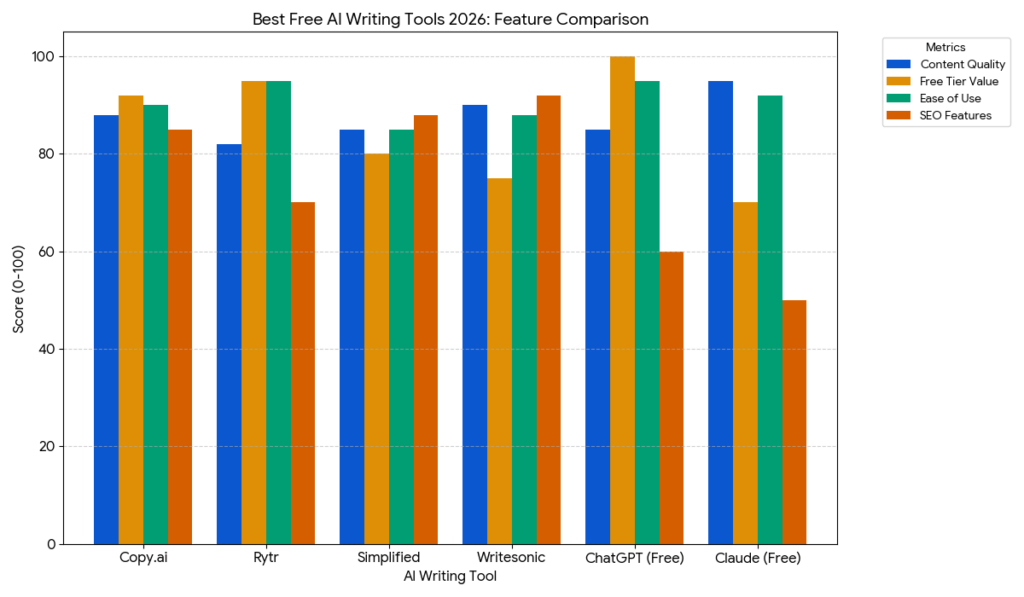
- The Verdict: The ultimate multi-tool. The free tier offers access to the highly capable GPT-4o architecture. It is incredibly balanced—equally competent at drafting client emails, brainstorming headlines, or structuring dense outlines.
- The Catch: Usage limits scale dynamically based on global server demand. During peak traffic hours, your access to the advanced model will temporarily downgrade to a faster, less analytical model.
Claude Free (Anthropic)
- The Verdict: The absolute gold standard for pure prose. Claude possesses an inherent understanding of syntax, tone, and pacing that feels distinctly human. If you need to write something that requires empathy, narrative flow, or complex nuance, start here.
- The Catch: The daily message allowance is notoriously strict. If you paste large files or have long, winding conversations, you can easily hit a usage wall within an hour.
Gemini Free (Google)
- The Verdict: A research assistant without equal. Because it is directly wired into Google’s live search index and boasts a massive native context window, Gemini can ingest massive amounts of source text and cross-reference it with real-time web data instantly.
- The Catch: The actual writing output can lean dry and clinical. It excels at synthesizing facts, but requires heavy manual editing to inject personality.
The Specialized Utility Duo: QuillBot & Grammarly
- QuillBot: This isn’t a conversational partner; it’s an editing scalpel. The free version remains an essential tool for breaking up clumsy sentences, rephrasing repetitive paragraphs, and shifting sentence structures when you run into a creative wall.
- Grammarly: The essential final layer. The free tier goes far beyond standard spell-check, acting as a real-time developmental editor that flags passive voice, stylistic fluff, and tone mismatches directly within your browser.
The Hybrid Workflow: Maximizing Value Without Spending a Dime
You do not have to commit to a single platform. The most efficient digital publishers operate by chaining these free tools together, utilizing the specific strengths of each model sequentially.
[ChatGPT Free] ──> Conceptualizes the outline and structural hierarchy │ ▼ [Gemini Free] ──> Pulls real-time data, facts, and live web citations │ ▼ [Claude Free] ──> Translates the raw data and outline into natural, fluid prose │ ▼ [Grammarly/QuillBot] ──> Flushes out mechanical errors and tightens syntax
Pro-Tips for Maximizing Output Quality
- Feed the AI Your Past Work: Before asking an LLM to generate an article, paste three paragraphs of your own writing into the chat. Instruct it: “Analyze the cadence, sentence length variability, and vocabulary choices of this text. Match this exact profile for all subsequent responses.”
- Separate Strategy from Execution: Never ask an AI to write an entire article from a single prompt. Use one turn to lock down the structural outline, a second turn to establish the core arguments for each section, and then generate the actual text section-by-section.
- The 80/20 Rule: Treat every AI output as an unpolished first draft. The algorithm excels at handling the cognitive heavy lifting of initial organization; your job is to step in as the expert editor to inject real-world experience, fact-check the claims, and refine the voice.

Independent technology writer focused on artificial intelligence, emerging technologies, and digital innovation. Covers AI applications in sports, productivity, and online business.