





































Connect with us

Hi, what are you looking for?

Tools

Best Free AI Writing Tools 2026: The Complete Guide (Tested & Ranked)

Tested and ranked free AI writing tools for 2026. Compare ChatGPT, Claude, Gemini, Grammarly, and more—find what actually works.

Claude AI: The Thoughtful AI Assistant Redefining How We Work and Create

Best Free AI Writing Tools 2026: The Complete Guide (Tested & Ranked)

A Confession from Someone Who Writes for a Living

Let me tell you something I didn’t expect to admit a couple of years ago.

I write for a living. Every single day. And for the longest time, I refused to touch AI writing tools. I was convinced they’d turn my writing into generic, soulless robot-speak. I was proud that every word came from my brain, not from some algorithm trained on who-knows-what.

Then a client asked me to complete a 50-page document project. I had two weeks to do what normally took me two months.

I stayed up until 3 AM for three nights straight. My eyes were burning. My creativity was gone. And I still had 40 pages left.

That’s when I caved and tried Jasper.

Was it magic? No. Nothing is. But it was the difference between pulling more all-nighters and actually finishing with time to spare. That project changed how I think about AI writing tools completely.

Here’s the reality I’ve learned after hundreds of hours testing both free and paid tools: AI writing tools in 2026 aren’t replacing writers. They’re replacing the parts of writing that were never why any of us became writers in the first place.

The formatting. The structuring. The staring at a blank page trying to find the right words when your brain is exhausted.

The actual craft of writing—the insight, the unique argument, the voice that sounds like you—that still has to come from a human. AI just helps you get there faster.

In this guide, I’m going to tell you exactly what I’ve learned after testing every tool I could get my hands on. I’ll cover the paid powerhouses (Jasper, Copy.ai, Writesonic) and the genuinely useful free tools (ChatGPT, Claude, Gemini, QuillBot, Grammarly, and a hidden gem called TinyWow).

No marketing fluff. No affiliate tricks. Just honest advice from someone who actually uses these tools daily.


Part 1: Understanding What AI Writing Tools Actually Do

Before we dive into comparisons, let’s get something straight.

AI writing tools are not magic. They don’t “think.” They don’t “understand” your topic. What they do is predict what word is most likely to come next based on patterns they learned from reading massive amounts of human-written text.

Think of them like a really advanced autocomplete. A very, very smart one. But still just predicting.

What they’re genuinely good at:

  • Getting you past the blank page when you don’t know how to start
  • Rewriting the same sentence in five different ways so you can pick the best one
  • Creating outlines and structures so you’re not starting from zero
  • Brainstorming ideas when you feel stuck
  • Generating multiple variations of headlines, emails, or social posts in seconds

What they’re absolutely not good at:

  • Fact-checking (they will confidently tell you something completely false)
  • Knowing your specific brand voice without you training them
  • Replacing actual research or original thinking
  • Writing anything that sounds truly human without heavy editing

Once you understand that, you stop being disappointed and start using them the right way.


Part 2: The Paid Powerhouses (When You’re Serious About Quality)

If you’re a professional writer, freelancer, or content marketer, the free tools will only take you so far. At some point, you’ll want to pay for something that just works without constant fighting.

I’ve tested the three biggest names extensively: Jasper, Copy.ai, and Writesonic. Here’s what I learned.


Jasper: The Polished Professional

Jasper was one of the first major AI writing tools, and in 2026, it still feels the most “complete.” When you open Jasper, you feel like you’re using a professional tool, not a science experiment.

What makes Jasper special:

  • Boss Mode: This is their long-form writing feature. You can write a whole blog post, and the AI remembers what you wrote earlier in the document. No repeating yourself or fixing contradictions.
  • Brand Voice: This actually works. You can train Jasper on your existing writing—paste in 5-10 blog posts you’ve written—and it learns your style. The output sounds like you, not like generic AI. This alone is worth the price for serious writers.
  • 80+ Templates: Need a Facebook ad? There’s a template. Product description? Template. Press release? Template. It’s like having a library of writing structures ready to go.
  • Chrome Extension: Write anywhere online (Gmail, Notion, WordPress) and summon Jasper with a shortcut.

The pricing (2026):

  • Creator: $49/month for 40,000 words
  • Pro: $99/month for 100,000 words
  • Business: Custom pricing (call them)

The honest truth about Jasper:

It’s expensive. There’s no way around that. If you’re just starting out or writing occasionally, $49/month might feel painful.

But if you write for a living? The time you save in the first week will pay for the whole year. I’ve tested the output quality against every competitor, and Jasper consistently produces the most polished first drafts. Less editing = more time for actual thinking.

Who should buy Jasper: Professional writers, marketing teams, agencies, anyone whose income depends on producing high-quality written content consistently.


Copy.ai: The Fast and Friendly Option

Copy.ai took a different approach than Jasper. Less template-obsessed. More focused on speed and creativity. It feels like the tool that was built by writers, for writers.

What makes Copy.ai special:

  • Actually usable free tier: I’ll get to this in the free tools section, but Copy.ai’s free tier is genuinely useful. No “just kidding” after 1,000 words.
  • Infographics generation: This is unique. Copy.ai can turn your text into shareable social graphics. It’s not Canva, but for quick social posts, it’s great.
  • Workflows: Automated sequences for content creation. You set up a workflow once (blog outline → draft → social promo → email newsletter) and it runs automatically.
  • Chat-like interface: Instead of hunting through templates, you just type what you want like you’re texting a friend. “Write 10 headlines for an article about budgeting for freelancers.” Done.

The pricing (2026):

  • Free: Limited daily use (genuinely usable)
  • Plus: $49/month for unlimited words
  • Teams: $249/month

The honest truth about Copy.ai:

The output is more creative than Jasper. Sometimes that’s good—you get unexpected angles you wouldn’t have thought of. Sometimes it’s less focused—you get weird tangents.

For social media content, email subject lines, and short-form copy, Copy.ai is excellent. For long-form blog posts, it’s fine but not as polished as Jasper.

Who should buy Copy.ai: Social media managers, email marketers, startups on a budget, anyone who needs quick variations of short copy.


Writesonic: The Value King

Writesonic positions itself as the “optimized for marketing and SEO” option. But honestly, what makes it most interesting is the price.

What makes Writesonic special:

  • Article Writer: Full article generation with outline, introduction, body sections, and conclusion. You give it a keyword and some direction, and it produces a complete draft.
  • Sonic Editor: An AI-enhanced document editor similar to Jasper’s Boss Mode but less polished.
  • Quality modes: Draft mode is fast and cheap. Premium mode is slower but better. You can choose based on your needs.
  • SEO integration: Pulls data about trending topics and content ideas. If you’re writing for search engines, this matters.

The pricing (2026):

  • Free: 10,000 word credits (enough to test thoroughly)
  • Basic: $19/month for unlimited words (yes, unlimited)
  • Premium: $49/month

The honest truth about Writesonic:

At $19/month for unlimited words, Writesonic is dramatically cheaper than Jasper ($49/month for 40,000 words) and Copy.ai ($49/month for unlimited).

The quality is good. Not as consistently excellent as Jasper, but genuinely good. For 90% of use cases, Writesonic’s output is perfectly fine. For the remaining 10%, you might need to edit more heavily.

If budget is tight, Writesonic is the smart choice. You get 80% of the quality for 40% of the price.

Who should buy Writesonic: Freelancers on a budget, small business owners, SEO-focused content creators, anyone who writes a lot but doesn’t have a big budget.


Head-to-Head: The Same Test, Three Different Results

Let me show you exactly what happened when I gave all three tools the exact same prompt.

The prompt: “Write an introduction for a blog post about budgeting for freelancers. Target audience: young professionals who are anxious about money and think they’re bad at managing it.”

Jasper’s output:

“Let’s be honest—freelancing sounds great until your first tax bill arrives. The freedom of being your own boss? Amazing. The stress of managing unpredictable income? Less amazing. Here’s the thing most budgeting advice gets wrong: it assumes you have a steady paycheck. You don’t. So this guide isn’t about restrictive budgets or never eating out again. It’s about understanding what actually comes in versus what goes out, and building a system that works for the chaotic reality of freelance life.”

My reaction: Clean, polished, professional. Reads like something from a reputable blog. Minimal editing needed. Winner for overall quality.

Copy.ai’s output:

“As a freelancer, you don’t get paid vacations. You don’t get a 401(k) match. You definitely don’t get a steady paycheck every two weeks. The bills still come, though. Every single month. So what do you do? This isn’t your mom’s budgeting advice (sorry, Mom). No spreadsheets that take three hours to update. No apps that make you feel guilty for buying coffee. Just a simple system for freelancers who want to stop stressing about money and start actually enjoying the freelance life.”

My reaction: More casual, punchier, sounds like someone actually talking. Reads like a friend giving advice over drinks. Winner for voice and personality.

Writesonic’s output:

“Financial security as a freelancer isn’t impossible. Many freelancers struggle with budgeting because their income varies month to month. This guide covers everything you need to know about managing freelance finances, including tracking income, handling irregular paychecks, saving for taxes, and building an emergency fund. By the end, you’ll have a clear plan for financial stability.”

My reaction: Professional and clear, but generic. Reads like a textbook. It’s not bad, but it doesn’t make me feel anything. Needs significant editing to add personality. Third place, but fine for SEO content.


Quick Comparison Table: Paid Tools

FeatureJasperCopy.aiWritesonic
Free tier10 days trial onlyYes (usable)10,000 credits
Entry price$49/month$49/month$19/month
Word limit at entry40,000 wordsUnlimitedUnlimited
Long-form writingExcellent (Boss Mode)GoodGood (Article Writer)
Templates80+90+100+
Brand voice trainingYes (excellent)LimitedNo
Output quality (1-10)9/108/107/10
Best forPolished long-formQuick short-formBudget SEO content

My recommendation:

  • Choose Jasper if: Quality matters more than price, you write long-form regularly, and you have an established brand voice to maintain.
  • Choose Copy.ai if: You want to try before buying (the free tier is real), you create social media content, or you prefer a chat-like interface.
  • Choose Writesonic if: Budget is your primary concern, you write SEO content, or you’re a freelancer just starting out.

Part 3: The Free Tools That Actually Work (Tested for Months)

Now, let me save you hours of frustration.

I spent three months testing every free AI writing tool I could find. Most of them are garbage. They either give you 100 words then demand payment, or they produce output so bad you’d rather write it yourself.

But some are genuinely useful. Like, actually useful for real work. Here they are.


ChatGPT Free: The Versatile All-Rounder

If you only remember one tool from this article, make it ChatGPT Free.

OpenAI’s free tier in 2026 includes access to GPT-4o (not the ancient, dumb version from 2023). The difference is night and day.

What it does well:

  • Blog post drafts: Give it an outline, and it writes a structured draft in seconds. You’ll need to edit for your voice, but the skeleton is solid.
  • Email drafting: This is genuinely excellent. “Write a professional but friendly email following up with a client who hasn’t paid their invoice” – done.
  • Brainstorming: “Give me 15 headlines about productivity for freelancers” – you’ll have them in 10 seconds.

The limitations:

  • Dynamic message cap: Typically 16 messages every 3 hours. During peak times, fewer. Not enough for a full day of heavy work, but fine for occasional use.
  • No image generation (requires paid)
  • No advanced voice mode (requires paid)

The honest truth: ChatGPT Free is the best all-around free tool because it’s so versatile. One minute you’re drafting a legal-looking client email. The next minute you’re brainstorming creative social posts. That flexibility is rare in free tools.

Best for: Getting quick drafts, overcoming blank page syndrome, and anyone who wants one tool that does a bit of everything.


Claude Free: The Quality Writer’s Secret Weapon

Claude is different. Ask any writer who’s tried it, and they’ll tell you: Claude’s writing just feels more human.

What it does well:

  • Following your voice: This is where Claude shines. Tell it “write like a frustrated senior developer explaining to a junior” – and it nails the tone immediately. Other AIs need multiple corrections to get there.
  • Complex instructions: For technical writing, documentation, or any task where precision matters, Claude produces fewer errors on the first try.
  • Iterative refinement: When you say “that’s not quite right, try again,” Claude actually improves. It doesn’t just rephrase the same sentence.

The limitations:

  • Message caps: About 30 messages per day during non-peak times. Less during busy hours.
  • No image capabilities at all
  • Slower responses during peak times

The honest truth: If you’re writing something where quality really matters – client deliverables, business documents, anything where looking unprofessional costs you – Claude Free is worth dealing with the message limits.

Best for: Writers who care about tone and nuance, developers writing documentation, anyone whose work needs precision.


Gemini Free: Google’s Research Powerhouse

Gemini doesn’t get enough credit. Probably because Google launched it in a rush and it was embarrassing at first. But in 2026? The free tier is surprisingly robust.

What it does well:

  • Massive context window: 2 million tokens on the free tier. That means you can paste an entire book – a whole book! – and ask questions about it. The others can’t do this even on paid plans.
  • Real-time search integration: Unlike ChatGPT and Claude, Gemini can browse the web right now and pull current sources. Need to write about something that happened last week? Gemini is your only free option.
  • Google Workspace integration: If you live in Gmail, Google Docs, and Google Drive, Gemini works across them. “Summarize my meeting notes from Drive” – done.

The limitations:

  • Writing quality is noticeably weaker than Claude or ChatGPT. The output is more generic and needs heavier editing.
  • Less useful if you’re outside Google’s ecosystem.

The honest truth: For research-heavy writing, Gemini is the best free tool by a mile. For creative writing or anything where voice matters? It’s fine, but you’ll be editing a lot.

Best for: Research, summarizing long documents, fact-checking, and anyone already deep in Google’s world.


QuillBot: The No-Nonsense Editor

QuillBot has been around forever (in internet years), and its free tier remains genuinely useful. The difference? It’s not trying to be a chatbot. It’s built specifically for improving writing.

What it does well:

  • AI Writer: Type a prompt, get a paragraph. No account required to try.
  • Grammar checker: Catches errors as you type. Works across most platforms.
  • Summarizer: Condense long articles into short notes (up to 1,200 words for free).
  • Paraphraser: Reword sentences when you’re stuck on how to say something differently.

The limitations:

  • It’s not a full writing tool like ChatGPT. You can’t have a conversation or generate long-form content easily.
  • Free features have limits (1,200 words for summarizer, 500 words for paraphraser in free version).

The honest truth: QuillBot is the tool you use after you’ve written something. It polishes, rephrases, and catches errors. It doesn’t replace ChatGPT – it complements it.

Best for: Editing, paraphrasing, summarizing, and anyone who wants a tool that just does one thing well.


Grammarly Free: The Editor You’ll Actually Use

Grammarly isn’t an AI writer in the same sense as the others. It’s an editing tool that’s added increasingly sophisticated AI features. But it’s worth including because it’s what most professional writers actually use daily.

What it does well:

  • Grammar and spelling: Catches mistakes most other tools miss. Not just typos – actual grammar issues.
  • Tone detection: Shows you if your email sounds too aggressive, too passive, or just weird.
  • Clarity suggestions: Highlights wordy sentences and offers concise alternatives.
  • 100 AI prompts per month: For quick rewrites when you’re stuck on a sentence.

The limitations:

  • 100 AI prompts per month goes fast if you’re writing daily.
  • It’s for editing, not generating. Don’t ask Grammarly to write your blog post from scratch.

The honest truth: I use Grammarly Free every single day. It catches things my tired brain misses. For the final polish before hitting publish, nothing beats it.

Best for: Final editing, catching errors, tone checking – the last 10% of writing that makes you look professional.


TinyWow: The Hidden Gem Nobody Talks About

TinyWow flies under the radar, which is a shame. It offers over 200 free tools, including a surprising number of AI writing utilities. And get this: no sign-up required.

What it does well:

  • Essay writer: Structured from outline to full essay
  • Blog post generator: Quick drafts
  • Paragraph completion: When you’re stuck mid-sentence
  • Content summarizer
  • Grammar fixer
  • YouTube script writer

The limitations:

  • Quality is inconsistent. Sometimes great, sometimes weird.
  • 200+ tools means it’s easy to get lost. Not as polished as the major players.

The honest truth: TinyWow is what you use when you need something quick and don’t want to sign up for anything. No account. No email. Just open and use. For overcoming total writer’s block, it’s perfect.

Best for: Quick templates, zero-friction use, and anyone who hates creating accounts for every tool they try.


Comparison Table: Free Tools

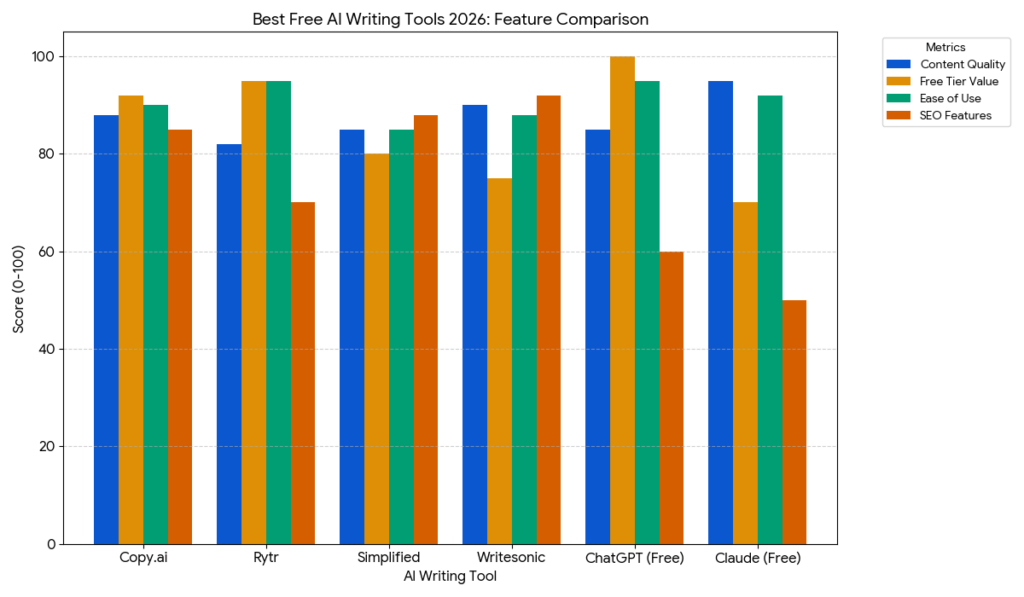
ToolBest ForFree LimitsWriting QualityUnique Feature
ChatGPT FreeVersatility, quick drafts~16 msgs/3 hoursGoodCan do almost anything
Claude FreeQuality prose, nuance~30 msgs/dayExcellentBest voice matching
Gemini FreeResearch, long docsVery generousModerateReal-time search + 2M context
QuillBotEditing, paraphrasing1,200 word summaryGoodNo login required
GrammarlyFinal polish100 AI prompts/monthGoodIndustry-standard editing
TinyWowQuick templatesVaries by toolModerateNo sign-up at all

Part 4: How I Actually Use These Tools Together (Free Only)

Here’s the thing nobody tells you: you don’t have to pick one. Use multiple tools. They’re free.

Here’s my actual workflow for writing an article like this one, costing me exactly $0:

Step 1 – Outline: I open ChatGPT Free and say, “Give me an outline for a guide comparing free AI writing tools.” 30 seconds later, I have a structure.

Step 2 – Research (if needed): If I need current information, I use Gemini Free with web search. “What are the latest updates to ChatGPT’s free tier?” It pulls recent articles with citations.

Step 3 – Drafting: For the main sections, I switch to Claude Free. “Write this section in a conversational, helpful tone – like a more experienced friend explaining things.” The quality is better than ChatGPT’s default corporate tone.

Step 4 – Editing: I paste everything into Grammarly Free to catch typos and awkward sentences.

Step 5 – Quick fixes: If I’m stuck rephrasing one stubborn sentence, I use QuillBot’s paraphraser or TinyWow for a quick alternative.

Total time for a 3,000-word article? About 90 minutes instead of 5+ hours. All free.


Part 5: Pros and Cons Summary

ChatGPT Free

Pros: Versatile, can handle almost any writing task, good for quick drafts
Cons: Message limits during peak times, default tone is generic

Claude Free

Pros: Best natural writing quality, excellent at matching your voice
Cons: Strict message limits, no image or video capabilities

Gemini Free

Pros: Real-time search, massive 2M token context, Google Workspace integration
Cons: Writing feels generic, less useful outside Google ecosystem

QuillBot Free

Pros: Editing-focused, no login required for some features, straightforward
Cons: Not a full writing tool, feature limits

Grammarly Free

Pros: Industry-standard editing, tone detection, works across platforms
Cons: 100 AI prompts per month is tight for heavy use

TinyWow

Pros: 200+ tools, no sign-up required, great for quick fixes
Cons: Quality inconsistent, can feel like too many options

Jasper (Paid)

Pros: Most polished output, excellent brand voice training
Cons: Expensive, feature overload for solo writers

Copy.ai (Paid)

Pros: Creative outputs, usable free tier, great for short-form
Cons: Less polished for long-form, brand voice not as advanced

Writesonic (Paid)

Pros: Best pricing ($19/month for unlimited), good SEO features
Cons: Quality less consistent than Jasper, no brand voice feature


Part 6: Tips I Wish Someone Had Told Me

After hundreds of hours testing these tools, here’s what actually matters:

1. Be specific in your prompts.

Bad prompt: “Write about marketing.”
Good prompt: “Write a 300-word Instagram caption for a fitness brand. Sound like a supportive friend encouraging someone who feels intimidated by the gym.”

The difference in output quality is enormous.

2. Your first draft is a starting point, not a final product.

AI gives you a foundation. A pretty good foundation, actually. But it needs you to add the insight, the personality, the unique angle that only you have. Edit ruthlessly.

3. Use multiple tools for different purposes.

Don’t be loyal to one. Use Claude for quality prose, Gemini for research, QuillBot for editing. The combo is better than any single tool.

4. Let the AI see examples of your writing.

Before generating content “in your voice,” paste 3-5 examples of your actual writing into the conversation. Say “write like this.” The improvement is dramatic.

5. Check the model’s knowledge cutoff.

If you’re writing about current events, ChatGPT and Claude might be out of date. Use Gemini with web search for anything recent.

6. Don’t ignore the learning curve.

Even “easy” tools require some experimentation. What works for me might not work for you. Budget time to explore. It’s worth it.


Part 7: Frequently Asked Questions

Are AI writing tools really worth paying for?

For professional writers: yes. The time savings alone justify the cost. If you write occasionally, the free tools (ChatGPT + Claude + Gemini) might be enough.

Will Google penalize AI-generated content?

No. Google has explicitly stated it doesn’t penalize AI content as long as it’s “helpful for people.” What Google does penalize is low-quality AI content designed only to manipulate rankings. So don’t be lazy. Edit your AI drafts.

Which free tool is best for blog posts?

Claude Free produces the most natural prose that needs the least editing. ChatGPT Free is faster for rough drafts. Use both.

Can I use free AI writing tools for commercial work?

Generally yes, but check each tool’s terms. Most allow commercial use of output. The bigger concern with free tools is quality – I’d never send a client a Claude draft without heavy editing.

Which paid tool should I start with?

If budget is tight: Writesonic ($19/month). If quality matters most: Jasper ($49/month). If you’re not sure: start with Copy.ai’s free tier, then decide.


Conclusion: The Best Tool Depends on You

Here’s the honest truth I’ve learned after all this testing: the best AI writing tool in 2026 doesn’t exist.

Not because they’re all bad. Because different tasks need different tools.

Here’s my simple decision framework:

  • Need a quick draft for anything? Start with ChatGPT Free.
  • Writing quality matters most? Use Claude Free (or Jasper if you can pay).
  • Research + current information required? Gemini Free.
  • Editing and polish after drafting? Grammarly or QuillBot Free.
  • Quick templates with no sign-up? TinyWow.

And if you’re a professional writer with a budget? Get Jasper. It’s expensive, but the time you save on editing will pay for itself in the first month.

The best approach in 2026 isn’t finding one tool to do everything. It’s understanding which tool handles which task well – and using them together.

For me, that means spending $0 most months while getting 80% of what I used to pay $50/month for. And on months when I have a huge project? I pay for Jasper and consider it the best $49 I spend.

That’s not a gimmick. That’s just being smart with your tools.

Now go write something great. And if you get stuck? You know where to find the tools.


Final Ratings Summary

ToolRatingVerdict
Jasper (Paid)9/10Best overall quality
Copy.ai (Paid)7.5/10Best for short-form creativity
Writesonic (Paid)8/10Best value for budget-conscious
ChatGPT Free8.5/10Best all-around free tool
Claude Free8.5/10Best free writing quality
Gemini Free7.5/10Best free research tool
QuillBot Free7.5/10Best free editing tool
Grammarly Free7/10Best free polish tool
TinyWow7/10Best utility collection
1 Comment

1 Comment

  1. Pingback: Excel Automation Tools for Beginners: Best Ways to Automate Your Spreadsheets in 2026 - nextappszone

Leave a Reply

Your email address will not be published. Required fields are marked *

You May Also Like