
Why am I interested in this topic? I got tired of reading the same AI tool lists over and over. Every blog post recommended ChatGPT, Midjourney, and Canva AI like they’d just discovered fire. I wanted tools that solved specific problems — the ones without marketing teams behind them. So I spent a month testing over 30 free AI tools, and I kept a list of the ones that actually surprised me. These are those tools.
Not every useful AI tool has a billion-dollar ad budget. Some of the best ones are built by small teams, hosted by universities, or buried inside larger platforms nobody explores. If you only use the tools that show up in Google Ads, you’re missing the ones that actually save time.
I picked tools that meet three criteria: completely free (not a trial), genuinely useful for daily work, and rarely mentioned in mainstream lists. No ChatGPT, no Midjourney, no obvious names. Let’s get into it.
Why the Best Free AI Tools Stay Hidden
Companies that make general-purpose AI have massive marketing budgets. OpenAI, Google, Anthropic — they spend millions telling you their chatbots can do everything. And they can, sort of. But a general tool that does everything well tends to do nothing exceptionally.
The most useful AI tools I found are the opposite of general. They do one thing, and they do it better than any all-in-one platform. The trade-off is visibility. A tool that only solves one problem can’t justify a Super Bowl ad, so it spreads by word of mouth. That’s why you haven’t heard of most of these.
I also noticed a pattern. Many truly free tools come from academic institutions, open-source communities, or companies using them as a loss leader. They don’t have affiliate programs or aggressive upgrade funnels. They just work, and they stay free because the people behind them care more about impact than revenue.
How I Tested These Tools
I judged every tool on four things:
- Is it actually free? No credit card, no “free trial” that expires in 14 days.
- Does it solve a real problem? Not just a nice demo, but something you’d use weekly.
- Is it underrated? If it has 10 million users, it didn’t make the list.
- Does the quality hold up? I used each tool for at least a week across real tasks.
Some tools that looked promising on paper were terrible in practice. Others surprised me so much I kept using them after the test ended. The list below is everything that survived.
The 10 Free AI Tools Worth Your Time
1. Goblin Tools — Task Breakdown for the Overwhelmed
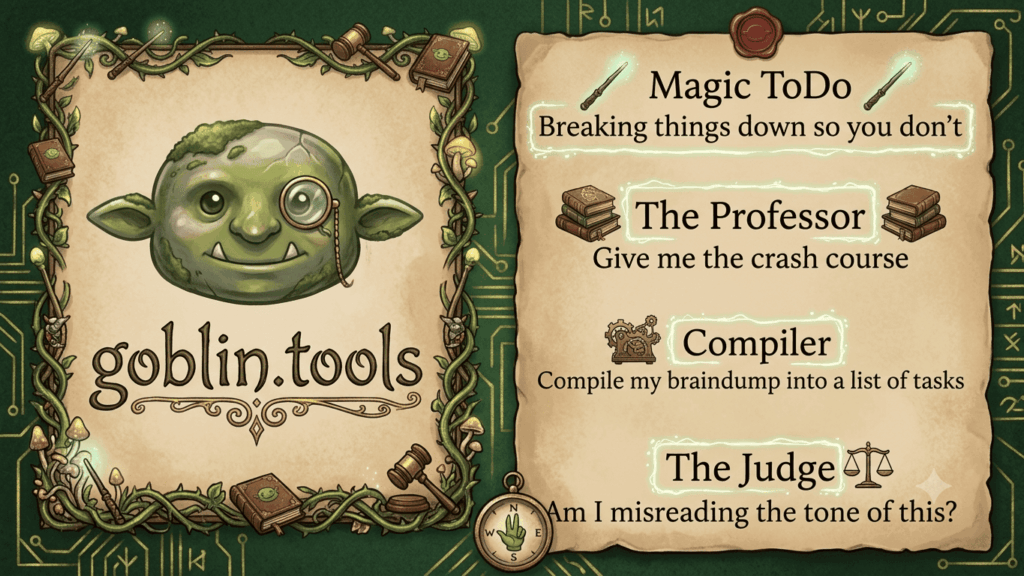
Goblin Tools is the most unexpected AI tool I’ve used this year. It was originally built for neurodivergent users who struggle with task initiation, but honestly, everyone benefits from it.
Here’s how it works. You type something vague like “clean my apartment” or “write a blog post.” The AI breaks it down into tiny, specific steps with time estimates. It even has a “spiciness” meter that tells you how complex each subtask is. No signup, no account, no paywall.
I used this to plan a website migration that had been sitting on my to-do list for months. Breaking it into 12 small tasks made it feel manageable. The tool also has a Magic ToDo feature that estimates how long each step takes, which is eerily accurate.
Official link: goblin.tools
2. NotebookLM — Google’s Research Secret Weapon
NotebookLM is Google’s source-grounded AI assistant, and it’s the most underrated free AI tool for anyone who works with documents. You upload your sources — PDFs, Google Docs, YouTube transcripts, websites — and it builds an AI that only works with your material.
No hallucinations about topics outside your sources. No made-up facts. It cites back to the original document with every response.
I uploaded 15 competitor analysis reports for a project and asked NotebookLM to find pricing patterns. It found three trends I had missed after reading the same docs myself. The Audio Overview feature, which turns your documents into a podcast-style conversation, is a bonus that feels like magic.
If you research anything for work, try this before you pay for any premium AI research tool.
Official link: notebooklm.google
If you want to learn how to evaluate tools like this properly, check out our framework for assessing AI tools.
3. ModelScope — Free GPU Compute Without the Hype
ModelScope is an open-source platform backed by Alibaba Cloud, and it offers free GPU compute for AI model inference. This is huge if you want to run vision models, text generation, or audio processing without paying for cloud credits.
You get free API calls, free model hosting, and even free LoRA training. The model library has thousands of pre-trained models covering NLP, computer vision, speech, and more. It’s China’s largest AI model community with over 5 million developers.
I tested their image generation models against Midjourney and was surprised by the quality. The English-language version is still growing, but the free compute alone makes this worth bookmarking.
Official link: modelscope.ai
4. tl;dv — AI Meeting Notes That Don’t Annoy Anyone
Tldv is a meeting recorder and transcription tool that works with Zoom, Google Meet, and Teams. What makes it different from Otter.ai or Fireflies is the free tier: 40 meetings per month, unlimited storage, AI summaries, and timestamped notes.
The AI generates meeting minutes that actually capture decisions, not just transcripts. It highlights action items and who owns them. I’ve been using it for client calls and it saves me about 30 minutes of note-taking per meeting.
The free plan is generous enough for freelancers and small teams. Most meeting AI tools limit you to 5-10 recordings before asking for money.
Official link: tldv.io
5. ImageFX — Google’s Image Generator Nobody Uses
Google’s ImageFX lives inside the AI Test Kitchen, and barely anyone knows it exists. It generates images with surprisingly good quality, and it’s completely free with no daily limit.
What sets it apart from DALL-E and Midjourney is the prompt refinement system. ImageFX suggests variations of your prompt that change specific elements, so you can iterate without retyping everything. The text rendering is better than most competitors too.
I used it to create featured images for three blog posts, and the results were good enough that readers asked which premium tool I used.
Official link: aitestkitchen.withgoogle.com/tools/image-fx
6. Poe — One Interface for Every AI Model
Poe by Quora lets you access GPT-4, Claude, Llama, Mistral, and dozens of other models from a single interface. The free tier gives you daily credits that refresh, and you can switch between models without managing multiple accounts.
The hidden advantage is the bot library. Users create custom bots with specific personalities and instructions. There are bots optimized for writing, coding, brainstorming, and even roleplaying scenarios for interview practice.
I use Poe when I want to compare how different models handle the same prompt. It’s faster than opening six tabs.
Official link: poe.com
7. Reclaim.ai — Calendar AI That Actually Respects Your Time
Reclaim.ai connects to your Google or Outlook calendar and automatically blocks time for deep work, habits, and breaks. It analyzes your existing meetings and fits tasks into the gaps without overlaps.
The free tier handles scheduling for one calendar, which is enough for individual users. You set your priorities, and Reclaim reshuffles your day to protect them. It also has a “Smart Nudges” feature that reminds you when you’re overbooked.
I tested this alongside Motion and Clockwise. Reclaim’s free tier is more generous than both, and the scheduling logic is smarter about not breaking focus blocks.
Official link: reclaim.ai
8. n8n — Open-Source Automation That Beats Zapier
n8n is an open-source workflow automation tool that you host yourself. Unlike Zapier or Make, there are no plan limits, no execution caps, and no per-operation billing. You run it on your own server, and it does whatever you want.
The learning curve is steeper than Zapier, but the freedom is worth it. I built a workflow that scrapes competitor blog posts, summarizes them with AI, and emails the digest to my team. The same setup on Zapier would cost about $50 per month.
If you’re technical or willing to follow a tutorial, n8n replaces most paid automation tools.
Official link: n8n.io
9. Suno — AI Music You’d Actually Listen To
Suno generates full songs from text prompts — including vocals, instrumentals, and lyrics. The free tier gives you a daily allocation of credits that generates about 10 songs per day.
The quality is better than any other free music AI I’ve tested. You can specify genres, moods, instruments, and even write your own lyrics. The vocals sound natural, not robotic.
I used Suno to create background music for a video project instead of paying for licensed tracks. The result wasn’t broadcast quality, but it was good enough for social media content.
Official link: suno.com
10. Kimi — The 2 Million Token Context Window
Kimi is an AI assistant developed by Moonshot AI, and its claim to fame is a 2 million token context window. That’s enough to process entire books, massive codebases, or hundreds of pages of documents in one go.
For comparison, Claude’s context window is 200K tokens. Kimi offers 10x that for free.
I uploaded the entire documentation set for an API I was integrating, and Kimi answered questions about specific endpoints instantly. No chunking, no “sorry, that’s outside my context window.” It just worked.
Official link: kimi.moonshot.cn
Which Free AI Tools Are Worth Stacking Together
You don’t need all ten. I use three in my daily workflow:
- NotebookLM for research and document analysis
- Reclaim.ai to protect my calendar from meeting sprawl
- n8n for automating repetitive tasks
Pick the ones that match your actual problems. If you write content, start with ImageFX and NotebookLM. If you’re a developer, try n8n and ModelScope. If you just feel overwhelmed, Goblin Tools costs nothing and takes 10 seconds to try.
We have a full guide on the best free AI writing tools if text generation is your priority. For broader options, our comparison of AI content generators covers the paid vs free landscape in detail. And if you’re curious what a month of testing looks like, this experiment with 10 free tools reached a similar conclusion — most aren’t worth it, but the good ones are excellent.
Frequently Asked Questions
Are these free AI tools really free, or are they trials? Every tool on this list has a permanent free tier. No credit card required, no trial expiration. Some have usage limits that reset daily or monthly.
Which free AI tool is best for writing? NotebookLM is excellent for research-heavy writing. For general drafting, Poe gives you access to multiple models so you can find what works for you.
Can I use these tools for commercial projects? Most allow commercial use in their terms, but always check the license. Suno and ImageFX are generally safe for commercial content.
How do free AI tools make money if they don’t charge users? Some are loss leaders for paid plans (Reclaim.ai, Poe, tl;dv). Others are backed by large companies (ModelScope by Alibaba, ImageFX by Google). n8n is open-source and monetizes through their cloud hosting.
Are free AI tools safe to use with my data? Check each tool’s privacy policy. NotebookLM doesn’t train on your uploaded documents. Goblin Tools processes everything locally in your browser. For sensitive work, n8n (self-hosted) gives you full data control.
What’s the most underrated free AI tool on this list? NotebookLM, without question. Google barely markets it, but it’s the most capable document AI I’ve tested.
Conclusion
The best free AI tools aren’t the ones with the biggest ad budgets. They’re the ones solving specific problems for specific people. NotebookLM, ModelScope, Goblin Tools, and the others on this list don’t make headlines, but they make work easier. Try one this week. You might be surprised what you find.

Independent technology writer focused on artificial intelligence, emerging technologies, and digital innovation. Covers AI applications in sports, productivity, and online business.