































The Great App Overhaul: Why 2026 is Year One for the Practical Smartphone
If you look at the home screen of anyone who lives on their phone, you’ll notice a quiet shift happening right now. For the past decade, the app economy was a game of volume. We downloaded single-purpose, bloated apps that hoarded our data, spammed our notification bars, and drained our batteries just to do one basic task.
But as we hit the middle of 2026, that playbook is dead.
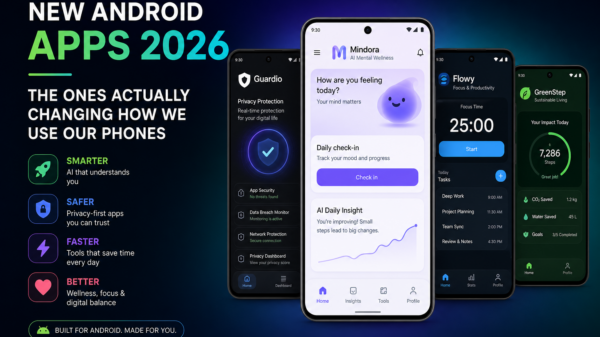
Between the massive push for localized AI and a growing collective fatigue over endless app subscriptions, people are aggressively clearing out their storage. We are no longer chasing novelty. Instead, a new class of utility is taking over—software that actually earns its place on your device by doing heavy lifting without the fluff.
After spending months auditing my own digital workspace and testing how the latest Android updates handle daily workflows, these are the apps that survived the purge. They aren’t just cool tools; they are the new infrastructure of a functional smartphone.
The New Baseline for Productivity: Google Gemini
It’s impossible to talk about mobile software today without addressing how fast AI assistants grew up. A couple of years ago, using voice assistants felt like arguing with a stubborn chatbot. Today, Gemini handles a massive one-million-token context window right from an Android interface.
In practice, this completely changes how I handle a mobile workflow. Instead of waiting until I’m back at my laptop to review long PDFs or cross-reference massive spreadsheets, I can drop a 50-page industry report into the app while sitting on a train, ask it to isolate the core financial risks, and draft a follow-up email to my team in seconds.
Because it hooks directly into Gmail, Drive, and Maps, it doesn’t feel like an external app you have to jump into—it feels like an extension of the operating system itself.
Breaking the Subscription Trap: Bitwarden
Digital security has become incredibly frustrating, mostly because every major password manager has slowly pushed users behind a aggressive paywall. When competitors started restricting basic features like multi-device syncing on their free tiers, Bitwarden doubled down on its open-source roots.
It still offers unlimited password storage and cross-platform syncing without demanding a credit card. The interface isn’t as flashy as some of its venture-backed rivals, but it works flawlessly with Android’s native autofill frameworks and handles two-factor authentication (2FA) tokens without a hitch. In an era where data breaches are a weekly headline, having a transparent, publicly audited vault that doesn’t rent-seek your basic security is a non-negotiable.
Reclaiming the Interface: Nova Launcher
Android 15 brought some great under-the-hood performance updates, but stock software interfaces across different phone brands still feel remarkably rigid. Nova Launcher remains the best way to bypass corporate bloatware and design a phone that adapts to you, not the manufacturer’s ad partnerships.
My current setup relies heavily on its gesture mapping: a double-tap locks the screen, a pinch opens a clean app drawer, and custom icon swipes launch secondary apps without cluttering the screen. It strips away the visual noise, resulting in a phone that feels faster simply because you aren’t hunting through three pages of folders to find your banking app.
Escaping the Ecosystem: DuckDuckGo & Poweramp
The browser is where most mobile tracking happens, and while Chrome is the default, it’s fundamentally built to feed an advertising machine. Switching to DuckDuckGo as a daily driver immediately cleans up the mobile web experience. Its App Tracking Protection works quietly in the background, blocking background data harvesting from other installed apps. And when you’re done browsing, hitting the “Fire” button wipes the active session instantly.
On the media side, streaming platforms like Spotify have spent the last few years optimizing for algorithms and podcasts while compressing audio quality down to a muddy baseline. For anyone who still cares about actual high-fidelity sound, Poweramp is a masterpiece. It handles raw local audio formats like FLAC and OPUS through an advanced internal equalizer engine that bypasses the standard Android audio degradation. It’s built for people who want to own their music library, not stream it.
The Shift Toward Intentional Design
The rest of my daily setup is rounded out by highly focused, quiet utilities. There’s AnyList, which makes shared family grocery lists and recipe scaling effortless; Parkwolf, a lifeline for tracking trail maps and offline park alerts; and Caresleep, a background sound engine that runs completely offline with zero tracking or pop-up ads.
Looking at the broader landscape, it’s clear that the app economy is maturing. The era of the “viral app” that does a clever trick for a week before dying out is over. The apps worth keeping in 2026 are the ones that treat your screen time with respect, safeguard your data, and solve a specific problem seamlessly.
If an app isn’t making your life noticeably simpler or your data more secure, it’s just digital noise. It’s time to hit delete.

Independent technology writer focused on artificial intelligence, emerging technologies, and digital innovation. Covers AI applications in sports, productivity, and online business.