










































I deleted Google’s AI tools from my bookmarks three times before I gave them a fair chance.
Not because they were bad. Because every article I read about them sounded like a press release. Twenty screenshots, forty promises, zero mention of the watermark on your video or the message telling you your free allowance ran out at 11pm.
So I ran my own test. Thirty days, real work, no tech-press polish. Just me, a Google account, and six tools, doing the jobs I would normally pay for. Here is what happened, in the order it happened.
Day 1: The rules of the game
Before touching anything, I set ground rules. “Actually works” means the tool does the job without me fighting it. A tool that produces a good result after forty minutes of wrestling is a tool that failed. I used each one for the kind of task it claims to solve. Writing, research, images, coding, voice. And I kept notes on where each one made me give up, because those notes turned out to be more useful than the wins.
One more rule. No clicking through ads disguised as features. If a tool asked me to pay mid-task, it went in the “paid” bucket and stayed there. This is a list of what is free, not what is free-ish.
Day 3: Gemini, the one everyone talks about
Gemini is the flagship, and the flagship is genuinely good at the boring stuff. I gave it emails, outlines, a resignation letter, a diet plan, and the kind of “help me sound less angry in this reply” that nobody likes admitting they need. It handled all of it faster than I could have, and mostly without that hollow corporate voice ChatGPT sometimes slips into.
Two things surprised me.
First, the free model is not a demo. It runs Gemini 3.6 Flash, which Google shipped to everyone on July 21, 2026. That is the real model, not a crippled version of it. Image editing works on the free tier. Voice mode works. Even a daily taste of the stronger Gemini 3.1 Pro shows up before the app quietly switches you back to Flash.
Second, the limits are real and they arrive without ceremony. Around the end of my first week, a heavy research session ended with a message telling me I was close to my allowance. Google does not publish an exact number of free messages. It uses what it calls compute-based limits, where a complex prompt costs more than a simple one, refreshing every five hours with a weekly cap on top. It is honest. It is also impossible to plan around, because you never know exactly where the line is until you hit it.
The image generation, by the way, is better than it has any right to be on a free tier. Nano Banana 2 handled the “make this boring photo look like a studio shot” task without complaint.
Day 11: NotebookLM, the one nobody mentions
Here is the moment that changed my opinion of the whole lineup.
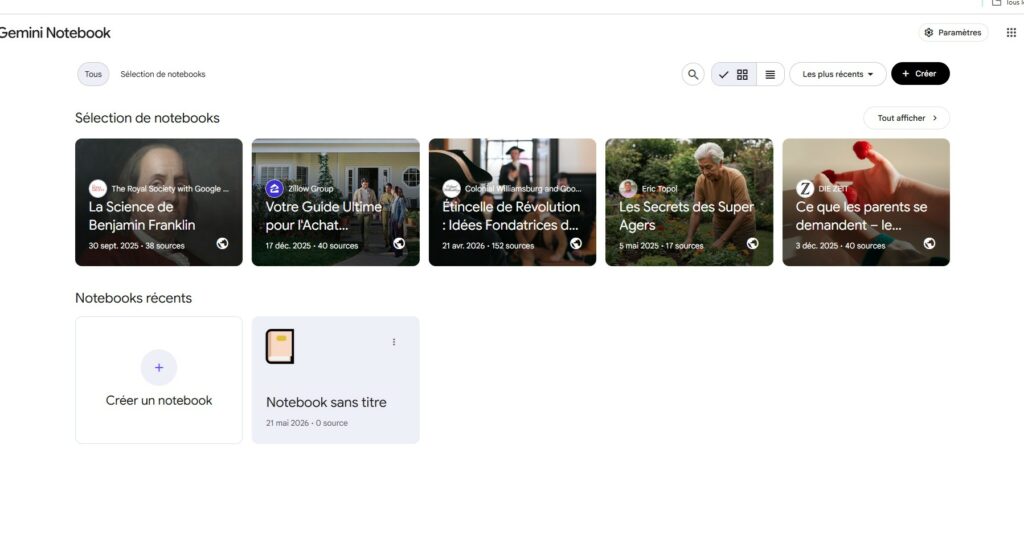
I had a forty-page PDF I genuinely needed to understand. A contract, the kind with sections that contradict themselves. I had been avoiding it for days. On a whim I dropped it into NotebookLM, Google’s research tool that takes your documents and answers questions about them instead of making things up from general knowledge.
It summarized the whole thing in seconds. Then it built a study guide. Then, because I am a person who needs to hear things to absorb them, it generated an Audio Overview. That is the feature where two AI hosts have a podcast-style conversation about your documents. I expected a gimmick. I got a genuinely useful way to process a dense document while making coffee.
The free tier here is the most generous of the group. A hundred notebooks. Fifty sources per notebook. Fifty chat questions a day. Three Audio Overviews a day. For research, study, or anyone staring at a mountain of reading, this is the tool that actually earns its place. I have told three people about it this month. All three came back with the same reaction.
Day 18: Google AI Studio, the one with no polish
Google AI Studio looks like it was designed by an engineer for other engineers, and that is exactly why it works so well.
There is no chatbot charm here. No suggested prompts, no friendly suggestions. You pick a model, type a prompt, and the raw response appears. That’s it. It is free, no credit card, no trial that expires. And it taught me more about how these models actually behave than a month of polished interfaces ever did.
I asked the same question to Flash, Flash-Lite, and the others, and watched how their answers changed. I tested how a prompt’s wording shifted an output. I built a couple of tiny automations. None of it required me to write a single line of code, which was the part I was dreading and the part that turned out not to matter.
The catch is at the top end. The most powerful Pro model preview is not available free through the API. For experiments and everyday model access, you are fine. For serious production work, you will pay.
Day 24: Flow, the one with a new name
Somewhere in my testing, I kept clicking bookmarks that led nowhere. That is because Google shut down two of its image tools, Whisk and ImageFX, on April 30, 2026, and folded both into one new tool called Flow.
Flow does what both old tools did. You describe a scene, remix a subject with a style, generate an image. The free tier gives you a daily allowance of images and short video clips. The fine print is the watermark, which sits on every free export, and the fact that proper video generation still lives behind a paid plan.
I used it for mood boards and quick visual ideas. It is good at that. It is not good at letting you forget you are on the free tier, because that watermark is always there, which is probably the point.
Day 27: The things they keep for paying customers
Somewhere around this day I stopped testing and started reading the fine print. The pattern is consistent across every Google product, and once you see it, the whole free strategy becomes obvious.
Video generation. Not free. Anywhere. Gemini, Flow, the API. All of it requires a paid Google AI plan.
The best app integrations. Gemini inside Gmail, Docs, Sheets and Vids, the feature Google advertises hardest, is not free. It needs Google AI Plus at $4.99 a month, and the better version needs Pro. The free Gemini app can touch your connected apps, but the full Workspace experience is a subscription.
Context window. The free tier gives you 32,000 tokens, roughly fifty pages of text. Long documents have to be chopped into pieces, and chopping a contract into pieces is exactly how you miss a clause.
Everything else, the daily driver, the research, the images, the voice, is free. Those four walls are where Google earns its money. That is the entire business model in one sentence, and it is a fair one.
The fine print, in one screen
| What you get free | The ceiling |
|---|---|
| Gemini 3.6 Flash | Default model, no extra cost |
| Gemini 3.1 Pro | Limited daily access |
| Context window | 32,000 tokens, about 50 pages |
| Deep Research | 5 reports per month |
| Image generation | Capped daily |
| Audio upload | 10 minutes total |
| Video upload | 5 minutes total |
| Video generation | Not included |
| Cloud storage | 15 GB, shared with Gmail and Drive |
Read it once and the deal is clear. Google gives you a strong daily driver, a taste of the premium model, and enough creative tools to stay interesting. It keeps heavy research, long media, and video behind the counter.
What I actually use now
Thirty days later, my honest stack is smaller than I expected.
Gemini handles daily writing, drafting, and the occasional photo edit. NotebookLM is my default for anything that involves reading. Google AI Studio sits in my bookmarks for the moments I want to understand why a model said what it said. Flow comes out for quick visual ideas. The voice mode on Gemini Live gets used more than I want to admit, because talking to a phone while driving beats texting it.
That is the whole list. Five uses, four tools, zero dollars.
If you are starting today
Do not try everything at once. That is the mistake I made and the mistake most guides encourage.
Start with Gemini for a week. Just chat. Let it write things you would normally write. If you hit a wall with documents, open NotebookLM. That is the pair that covers most people’s actual needs. Add the others only when you have a specific reason.
And set your expectations honestly. Free means free, but it does not mean unlimited. Google is not running a charity. It is giving you the daily driver so you can discover, on your own time, exactly where the paid upgrades start.
Questions people actually ask
Is the free tier a trial?
No. No card, no countdown, no expiry. It is a permanent free product with usage caps.
How much can I use it before it stops?
Google does not publish a number. The limits are compute-based and refresh every five hours with a weekly cap. Casual chat and writing rarely hit it. Research marathons and heavy image generation will.
Is NotebookLM really free?
Yes, and generously so. A hundred notebooks, fifty sources each, fifty daily questions, three Audio Overviews a day. Enough for most real research work.
What happened to ImageFX and Whisk?
Both shut down on April 30, 2026 and merged into Flow. Old bookmarks are dead links.
Can I make videos for free?
No. Video is the one thing Google keeps behind a paywall everywhere. Free users get watermarked images and short clips, and nothing more.
Is this the best free AI package out there?
For most people, it is in the conversation. The combination of a strong default model, free image editing, voice, and a genuinely good research tool is hard to beat at zero dollars. Compare it against the free tiers of the other big chatbots before you decide, because “best” depends on how you work.
The last word
The most useful thing I learned in thirty days was not which tool to use. It was the shape of the deal.
Google has built the strongest free AI package in the industry, then drawn clean lines around exactly what costs money. Video, deep research, and the best integrations. Everything on the free side of that line works. Everything on the paid side is where you should spend, if you decide to spend at all.
Start with Gemini, add NotebookLM the first time you face a stack of reading, and keep AI Studio for the days you want to understand the machine. That is the whole honest recommendation. The rest is noise.

Independent technology writer focused on artificial intelligence, emerging technologies, and digital innovation. Covers AI applications in sports, productivity, and online business.



