

























A Confession Before We Start
I needed a featured image for a blog post last year and had exactly zero dollars to spend. No budget for stock photos. No money for a designer. No skills to make something myself beyond basic Canva drag-and-drop.
So I did what everyone does now: I typed a description into a free AI image generator and waited.
What came back was a nightmare. The subject had seven fingers on one hand. The background looked like a Salvador Dalí painting had been run through a blender. The text I’d asked for was in a language that doesn’t exist.
I assumed the technology just wasn’t ready.
I was wrong. I was using the wrong tools, with the wrong prompts, in the wrong way. When I eventually figured out what actually works, the difference was night and day. The same blog post I’d struggled with later had a featured image so professional that someone asked me which designer I’d hired.
Here’s what I’ve learned after months of testing AI image generators — not just playing with them, but using them for real projects with real deadlines. Whether you’re a complete beginner with no budget or a professional willing to pay for the best, this guide will help you pick the right tool.
Part 1: The Three Giants (Paid, Professional)
Let’s start with the heavy hitters. Midjourney, DALL-E, and Stable Diffusion dominate the AI image generation landscape in 2026. Each has loyal followings — and for good reason. But choosing the wrong one for your project can mean wasted money, frustration, and results that miss the mark entirely.
Understanding the Three Contenders
Midjourney operates through a Discord-based interface (with a new web app rolling out) and has built a reputation for producing images with unmistakable artistic flair. The models emphasize aesthetics, color harmony, and cinematic composition over strict prompt adherence.
DALL-E 4 comes from OpenAI and integrates directly into ChatGPT. It’s the most accessible of the three — describe what you want conversationally, and it generally delivers. Recent updates finally fixed the text-rendering issues that plagued earlier versions.
Stable Diffusion 4 (and its ecosystem including FLUX) is open-source software that runs locally on your hardware. It offers maximum control but requires technical setup. No subscription, no cloud dependency, no content restrictions.
Image Quality: The Aesthetic Showdown
This is where the differences become visceral.
Midjourney produces images that look like art. Skin textures have realistic subsurface scattering. Lighting feels natural — golden hour rays, dramatic rim lights, volumetric fog. Commission an illustration or concept art, and Midjourney consistently delivers that “magazine quality” feel.
I tested this prompt: “A weary detective in a rain-soaked trench coat, standing under a flickering streetlamp, 1940s film noir style.”
- Midjourney delivered moody, cinematic perfection. The rain caught the light just right. The detective’s expression told a story.
- DALL-E got all the elements right but felt slightly sterile — like a high-quality stock photo rather than something with soul.
- Stable Diffusion required multiple attempts and custom LoRA models to approach the same artistic cohesion.
The takeaway: If visual impact is your priority, Midjourney wins. If accuracy matters more, DALL-E has the edge.
Text Rendering: The Dealbreaker Feature
I once rejected an entire client project because I couldn’t get AI to render the text on a poster correctly. Three years ago, this was a universal failure. In 2026?
DALL-E 4 finally solved text rendering. The model treats text as a first-class element — it understands fonts, kerning, alignment, and artistic integration. I generated a coffee shop menu with perfect sans-serif lettering, a neon sign with glow effects, and a product label with proper hierarchy. It just works.
Midjourney improved significantly but still occasionally produces “AI gibberish” letters in complex text scenarios. It’s usable for headlines but risky for precise typography.
Stable Diffusion requires technical intervention. The base model struggles with text, but community-developed models (especially FLUX) have dramatically improved this. Expect to experiment with different Checkpoint models and embeddings.
Control and Customization
This is where philosophy diverges completely.
DALL-E and Midjourney are “prompt-and-pray” — you describe what you want, they generate something in that universe, and you accept the result. Both offer some editing tools (DALL-E’s conversational regeneration is particularly intuitive), but neither offers true compositional control.
Stable Diffusion is different. With ControlNet, you can specify poses, depth maps, edge detection, and normal maps. You can:
- Extract a pose from a reference photo and force your AI to match it exactly
- Use depth maps to maintain spatial consistency across generations
- Control lighting through normal maps
I generated product mockups for an e-commerce client using Stable Diffusion. ControlNet ensured the product stayed in frame while backgrounds changed. Midjourney would have moved the product around; DALL-E would have mutated it.
Pricing: The Real Cost
Let’s talk money — but not just subscription prices.
| Tool | Direct Cost | Hidden Costs | Best For |
|---|---|---|---|
| Midjourney | $10-120/month | Time spent learning prompt syntax | Visual impact, artistry |
| DALL-E 4 | $20/month (ChatGPT+) | Limited batch size without higher tiers | Quick results, text rendering |
| Stable Diffusion | Free (self-hosted) | $1,500+ GPU setup or cloud costs | Control, privacy, high volume |
Midjourney: $10/month gets you 3.3 hours of fast generation — enough for casual use. At $30/month, you get 15 hours plus unlimited “relaxed” mode. The $120/month “Mega” tier is for professionals generating daily.
DALL-E 4: If you already pay for ChatGPT Plus ($20/month), you get DALL-E included. That bundle also includes GPT-5 access — a strong value proposition.
Stable Diffusion: Self-hosting is free after hardware investment. A used RTX 3060 12GB (around $250) is sufficient for 1024×1024 generation. If you generate 500+ images monthly, this breaks even quickly. Alternatively, cloud APIs (RunPod, Modal) offer pay-per-generation starting at $0.002 per image.
Privacy and Commercial Use
This matters more than people realize.
Midjourney and DALL-E are cloud-only. Your prompts and images go through external servers. This is fine for personal projects but concerning for:
- NDAs and client work
- Proprietary product designs
- Healthcare or legal visualizations
- Anything under embargo
Stable Diffusion runs entirely locally. Nothing leaves your machine. For agencies handling sensitive client work — or anyone generating content they’d rather keep private — this is a game-changer.
Pros and Cons Summary
Midjourney
- Pros: Unmatched aesthetic quality, best for artistic/illustrative work, strong community, consistent style outputs
- Cons: Expensive for heavy use, Discord interface, less accurate prompt adherence, limited editing control
DALL-E 4
- Pros: Best text rendering, seamless ChatGPT integration, easiest learning curve, strong value (GPT bundle)
- Cons: Limited creative control, cloud-only privacy concerns, “sterile” aesthetic at times, usage caps
Stable Diffusion 4
- Pros: Free (after hardware), maximum control via ControlNet, complete privacy, unlimited customization
- Cons: Steep technical learning curve, hardware investment required, base quality needs tuning, community support not official
Real Use Cases: What Should You Use?
| If you need… | Use this… |
|---|---|
| Book covers and artistic prints | Midjourney |
| Marketing materials with text | DALL-E 4 |
| Product photography with specific poses | Stable Diffusion + ControlNet |
| Quick concept exploration | DALL-E via ChatGPT |
| High-volume generation (500+/month) | Stable Diffusion |
| Private/proprietary work | Stable Diffusion (local) |
Part 2: The Best Free AI Image Generators (2026 Edition)
Not everyone has $20-120/month to spend on AI image generation. And honestly? You don’t need to spend anything to get genuinely usable results.
After testing dozens of free options, here are the ones that actually work.
Microsoft Designer: The One That Surprised Me Most
Microsoft Designer runs on DALL-E 3, and it’s the tool I now recommend to anyone starting from zero. Not because it’s the most powerful or the most flexible. Because it’s the hardest to get bad results from.
The generation is unlimited on the free tier. You type what you want, and within seconds you have a set of images that are, at minimum, usable. The detail is sharp. The colors are accurate. The AI understands spatial relationships well enough that you rarely get the nightmare anatomy problems that plague other free tools.
I tested it with a deliberately tricky prompt: “A cat wearing a detective hat examining a magnifying glass on a cluttered desk, film noir lighting.”
It handled the hat, the glass, the lighting, and the cat’s face without anything visibly wrong. That’s not a low bar. That’s genuinely difficult for AI, and it cleared it.
The downside: the images have a particular style you’ll start to recognize. There’s a DALL-E “look” — slightly glossy, slightly idealized — that makes images from this tool identifiable if you know what to look for. For most use cases, that doesn’t matter. For some, it will.
Best for: Beginners, unlimited generation, consistent quality
Leonardo.ai: When You Need Something That Doesn’t Look Like AI
Leonardo.ai is the tool I reach for when I want an image that doesn’t immediately read as AI-generated. It offers 150 free credits daily, which is generous enough for regular use without being unlimited.
What sets it apart is the style presets. You can generate images that look like oil paintings, anime stills, 3D renders, or pencil sketches. The photorealistic mode is good enough that I’ve used generated images as placeholder assets in client work without anyone noticing.
The interface is more complex than Microsoft Designer. There are parameters to adjust — guidance scale, dimensions, model selection — and the learning curve is real. But if you’re willing to spend twenty minutes understanding what the sliders do, the control you get back is worth it.
The community feed is genuinely useful. You can see what other people are generating, study their prompts, and learn what works before typing a single word yourself. I’ve found better prompt ideas browsing Leonardo’s feed than reading any “how to write AI prompts” guide.
Best for: Style variety, artistic control, learning from community
Canva: Not the Best Generator, But the Most Useful
Canva’s AI image generator isn’t the most powerful on this list. The quality is good, not exceptional. The monthly limit of 50 free generations is restrictive if you’re creating images regularly.
But Canva is where most of these images actually end up being used. Blog headers. Social media posts. Presentation slides. YouTube thumbnails. The fact that the generator lives inside the editor means you generate an image and immediately drop it into your design. No downloading. No re-uploading. No switching between tools.
If you’re already using Canva for design work, the AI image generator is a natural addition to your workflow. If you’re not using Canva at all, this probably shouldn’t be your primary image generation tool. The other options produce better raw output. But for convenience within an existing workflow, nothing else comes close.
Best for: Canva users, workflow integration, quick social graphics
Adobe Firefly: Professional Output, Limited Access
Adobe Firefly produces some of the best images I’ve seen from any free AI tool. The quality is consistently professional. The training data is ethically sourced, which matters if you’re concerned about the copyright gray areas that plague some other generators.
The problem is the free tier: 25 credits per month. That’s barely enough to test the tool, let alone use it regularly. If you need one image for an important project and quality is non-negotiable, Firefly is worth using those credits on. For everyday content creation, the limit is too tight to be practical.
The commercial usage rights on the free plan are a genuine advantage. Adobe is clearer than most about what you can and can’t do with generated images, which matters if you’re creating content for clients or products.
Best for: One-off high-quality images, ethical training data, commercial clarity
Stable Diffusion via DreamStudio: Powerful But Not for Beginners
DreamStudio offers 200 free credits for new users and access to Stable Diffusion, which is one of the best open-source models available. The customization options are extensive. You can adjust steps, CFG scale, dimensions, and model versions. You can inpaint and outpaint — editing specific areas of an image or extending it beyond its original borders.
This is the most powerful free option on the list. It’s also the least beginner-friendly. If you don’t know what “CFG scale” means or why “steps” matter, you’ll spend a lot of time producing images that look worse than what Microsoft Designer would give you with a simple prompt.
For someone willing to learn the technical side, Stable Diffusion offers creative control that no other free tool matches. For someone who just needs a quick image for a blog post, it’s overkill and probably frustrating.
Best for: Technical users, maximum control, learning the fundamentals
Free Tools Comparison Table
| Tool | Free Tier | Quality | Ease of Use | Best Feature |
|---|---|---|---|---|
| Microsoft Designer | Unlimited | Good | Very Easy | Can’t get bad results |
| Leonardo.ai | 150 credits/day | Very Good | Moderate | Style variety |
| Canva | 50 credits/month | Good | Very Easy | Workflow integration |
| Adobe Firefly | 25 credits/month | Excellent | Easy | Ethical training |
| DreamStudio | 200 total credits | Excellent | Difficult | Maximum control |
Part 3: The New Challengers (ChatGPT Images 2.0 vs Google Nano Banana 2)
Just when you thought you understood the landscape, both OpenAI and Google dropped major updates. This isn’t just incremental improvement — it’s a declaration of war.
ChatGPT Images 2.0: The Thinker
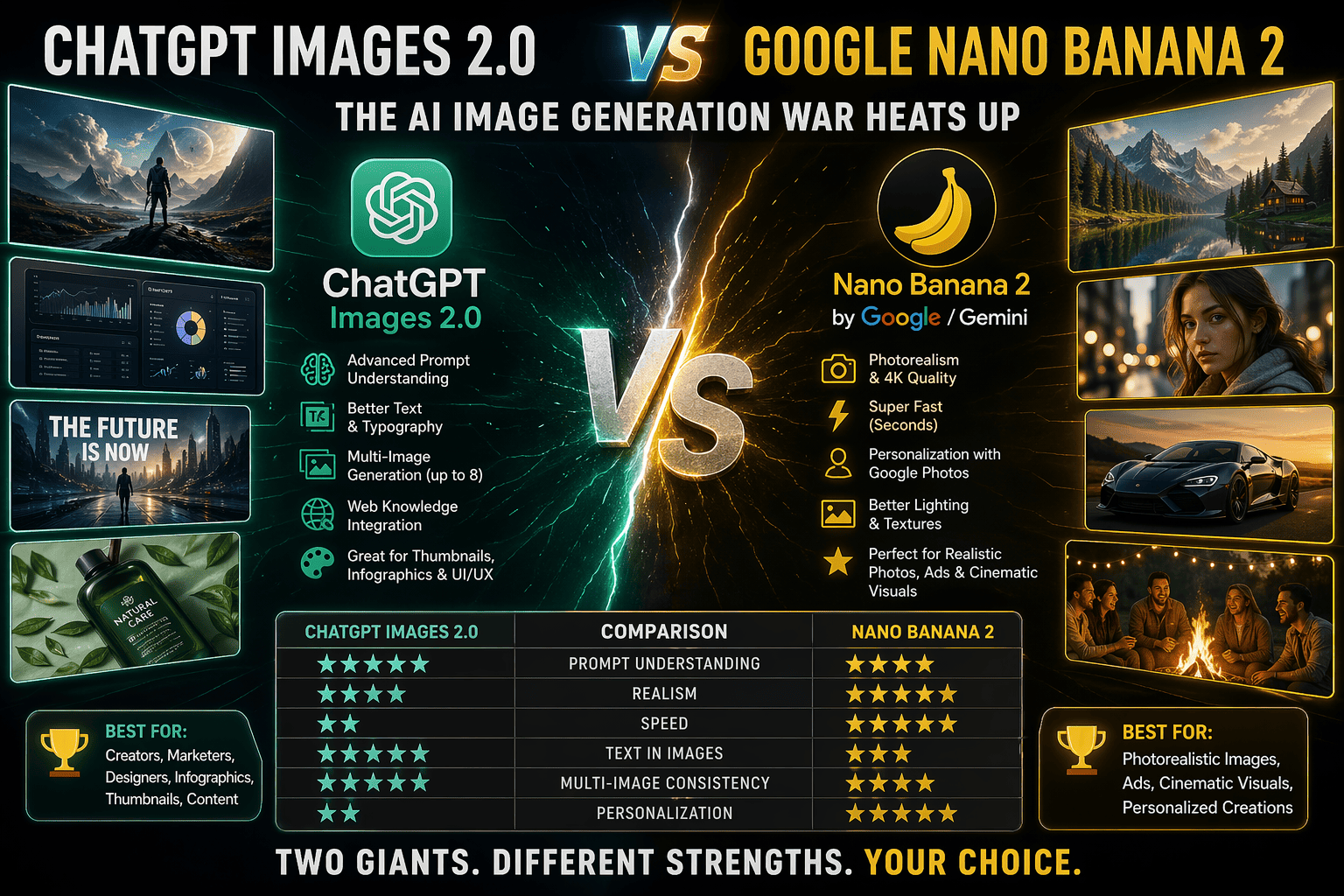
OpenAI launched ChatGPT Images 2.0 in April 2026, powered by their new GPT Image 2 model. This isn’t just an upgrade — it’s a complete reimagining of what AI image generation can do.
The big news? This model actually thinks before it generates.
When you select “thinking” or “pro” mode, ChatGPT Images 2.0 reasons through your prompt, searches the web for context if needed, and can even double-check its own outputs for accuracy. It can generate up to eight consistent images from a single prompt, keeping characters, objects, and styles uniform across all scenes.
The improvements aren’t just theoretical:
- Text rendering now handles dense text and non-Latin scripts (Japanese, Korean, Chinese) significantly better
- Resolution jumps to 2K quality
- Aspect ratios become flexible — anything from ultra-wide 3:1 to tall 1:3 formats
- Styles cover everything from cinematic stills to manga to pixel art
Who gets what: Advanced thinking features are available to ChatGPT Plus, Pro, and Business users. Free users still see quality improvements, but without the reasoning mode.
Nano Banana 2: Google’s Personalization Play
If ChatGPT Images 2.0 is OpenAI’s offensive move, Nano Banana 2 is Google’s counterpunch — and it’s weird in the best way.
Google’s Gemini app now includes Nano Banana 2 (yes, that’s really the name), which launched in February 2026 with a major April 2026 update. But here’s what makes it different: it taps into your actual Google Photos library.
Instead of generating generic images, Nano Banana 2 uses your personal photos and preferences to create visuals that actually look like your life. Ask for a picture of yourself at the beach, and it pulls from your actual beach photos. Request a family portrait, and it incorporates your real family members.
This “personal intelligence” approach is Google’s bet that AI image generation’s future isn’t just better quality — it’s hyper-personalization.
The three Nano Banana models:
- Nano Banana 2 (Flash) – Speed-focused, generates 512px to 4K in seconds
- Nano Banana Pro – Precision-focused, powered by Gemini 3 Pro
- Nano Banana (Thinking) – For complex scenes, with real-time Google Search integration
Text rendering works in over 100 languages, and outputs go up to 4K resolution.
Head-to-Head: How Do They Compare?
| Feature | ChatGPT Images 2.0 | Nano Banana 2 |
|---|---|---|
| Reasoning | Yes, with web search | Yes, with World Knowledge |
| Personalization | Limited | Uses Google Photos |
| Max Resolution | 2K | 4K |
| Text Rendering | Excellent (especially non-Latin) | Excellent (100+ languages) |
| Consistency | 8 images per prompt | Storyboard mode |
| Thinking Mode | Plus/Pro/Business only | All users |
| Integration | ChatGPT ecosystem | Google ecosystem |
Real-World Use Cases
For content creators: ChatGPT Images 2.0 shines when you need consistent characters across multiple frames. Create a manga series, design a storyboard for every room in a house, or generate social media graphics with uniform branding. The thinking mode actually understands your intent rather than just executing keywords.
For businesses: Nano Banana 2’s integration with Google Workspace makes it attractive for marketing teams already in Google’s ecosystem. Generate product mockups, localized ads in multiple languages, and data visualizations without leaving your workflow.
For personal use: Nano Banana 2’s photo integration is genuinely magical. Generate birthday invitations featuring your actual family. Create vacation photos in places you’ve never been. The personalization makes outputs feel meaningful in a way generic generation can’t match.
Pros and Cons
ChatGPT Images 2.0
- Pros: Best-in-class reasoning, superior text rendering, consistent character generation, strong instruction-following
- Cons: Thinking mode locked behind paid plans, no native personal photo integration, max 2K resolution
Nano Banana 2
- Pros: Deep Google Photos integration for personalization, 4K resolution, three model options, free thinking mode for all users
- Cons: Requires Google ecosystem commitment, generic outputs without personalization, less focused on consistent multi-image generation
The Bottom Line
OpenAI’s ChatGPT Images 2.0 represents a massive leap forward in AI image generation. The reasoning capabilities alone put it ahead of where we thought this technology would be in 2026.
Google isn’t sleeping either — Nano Banana 2’s personalization strategy could be the differentiator that wins over casual users.
If you need consistent multi-image generation with superior text rendering, ChatGPT Images 2.0 is your pick.
If you want hyper-personalized images drawn from your actual life, Nano Banana 2 wins.
The real winner? Anyone who gets to use these tools. We’re living in a time where the only limit is your imagination — and apparently, whether you prefer OpenAI or Google’s ecosystem.
Part 4: Why Your Prompts Are Producing Bad Images (And How to Fix It)
After testing hundreds of generations across all these tools, the single biggest variable wasn’t which tool I used. It was how I described what I wanted.
The Vague Prompt Trap
Vague prompts produce vague results. “A beautiful landscape” gives you the most generic, least interesting version of a landscape possible. The AI defaults to the statistical average of what landscapes look like, which is exactly what you’d expect: green hills, blue sky, maybe a tree, completely forgettable.
A specific prompt changes everything. “A mountain lake at sunrise, pine trees reflecting in still water, mist rising from the surface, golden light catching the peaks, photorealistic, 16:9 ratio” — that produces something you might actually use.
The difference is detail. The AI needs constraints to produce something interesting. Without them, it defaults to safe and boring.
Style References Matter
Adding “oil painting,” “watercolor,” “cyberpunk,” “film photography,” or “flat vector illustration” to your prompt doesn’t just change the look. It gives the AI a specific tradition of images to draw from, which produces more coherent results than letting it guess what style you want.
Lighting Descriptions Are the Hidden Quality Lever
“Golden hour,” “dramatic shadows,” “soft diffused light,” “neon glow” — these phrases tell the AI how to handle the most important variable in any image: where the light comes from and what it does.
The difference between a flat, uninteresting image and one with atmosphere is often just adding a lighting description to your prompt.
Negative Prompts (Tell It What You Don’t Want)
“Blurry,” “distorted,” “extra limbs,” “watermark,” “ugly,” “deformed” — adding these exclusions reduces the chance of getting an image with obvious AI artifacts. Most tools support negative prompting. Use it.
My Prompt Template
Here’s a template that consistently produces good results across all tools:
“[Subject description], [action or context], [lighting description], [style reference], [composition notes], [negative prompts]”
Example:
“A tired but determined freelance writer typing at a laptop in a cozy coffee shop, steam rising from a mug, warm golden hour light through a window, cinematic still, close-up on hands and keyboard, photorealistic –no blurry distorted extra fingers”
Part 5: The Limitations Nobody Mentions
AI image generators still struggle with certain things. Be aware of these before you invest time.
Hands are the famous example — fingers merge, multiply, or bend in impossible directions. Even the best models mess this up occasionally.
Text within images is still unreliable for long phrases or complex layouts. Short words (“SALE,” “OPEN”) work fine. Sentences are risky.
Complex symmetry (faces, architecture, patterns) can fall apart under scrutiny. Look closely at both sides of the image.
Detailed backgrounds sometimes have weird artifacts — furniture that blends into walls, impossible perspective, objects that don’t make sense.
More importantly, these tools produce images based on patterns in their training data. They don’t understand what they’re creating. They can’t reason about composition the way a human designer can. The output is a statistical best guess at what matches your prompt, not an intentional creative decision.
This matters less for quick social media graphics. It matters more if you’re trying to create something that needs to communicate a specific idea with precision.
Part 6: Putting It All Together — Your Decision Framework
With so many options, how do you choose? Here’s my simple framework.
For Complete Beginners (No Budget)
Start with Microsoft Designer. It’s free, unlimited, and produces consistently usable results without requiring prompt engineering expertise.
Then explore Leonardo.ai for style variety once you’re comfortable.
Only pay when you hit the limits of what free tools can do.
For Professionals (Quality Matters)
Start with DALL-E 4 via ChatGPT Plus. The $20/month gets you both image generation and the full language model — best value in the space.
Add Midjourney if you need artistic quality that DALL-E can’t match. The $30/month tier is usually sufficient.
Add Stable Diffusion only if you need control or privacy that the cloud tools can’t provide — or if you’re generating hundreds of images monthly.
For Specific Use Cases
| Your Primary Need | Start Here |
|---|---|
| Artistic/illustrative work | Midjourney |
| Text-heavy marketing materials | DALL-E 4 |
| Product mockups with specific poses | Stable Diffusion + ControlNet |
| Personal photos and memories | Nano Banana 2 |
| Quick social media graphics | Microsoft Designer (free) |
| Integration with existing design workflow | Canva AI |
The Multi-Tool Reality
The professionals I know don’t pick one tool. They use multiple:
- Midjourney for hero visuals that need to impress
- DALL-E for text-heavy designs and quick iterations
- Stable Diffusion for controlled batch work and private projects
- Microsoft Designer for quick, no-fuss generation when quality isn’t critical
This sounds complex, but it becomes natural. Each tool has a clear lane. You route each task to the right option.
Part 7: My Honest Verdict
No single AI image generator is “best.” They’re different tools for different jobs.
Midjourney rewards artistic vision with unmatched beauty. If you want images that look like art, this is your tool.
DALL-E 4 delivers reliable accuracy with minimal friction. The ChatGPT integration makes it the easiest to use, and the text rendering is finally solved.
Stable Diffusion grants control that serious professionals need. If you care about privacy, cost at scale, or precise composition, this is the only choice.
ChatGPT Images 2.0 brings reasoning to image generation. The thinking mode understands intent in ways other tools don’t.
Nano Banana 2 personalizes images using your actual photos. For personal projects and Google ecosystem users, this is genuinely magical.
Microsoft Designer is the best free option for beginners. Unlimited generation, hard to get bad results.
For most people in 2026, I’d recommend starting with DALL-E through ChatGPT Plus since $20 gets you both image generation and the full language model.
Add Midjourney if visual quality becomes your bottleneck.
Add Stable Diffusion only when you need the control — or privacy — that cloud tools can’t provide.
And for quick, free, unlimited generation when you don’t need perfection? Microsoft Designer has your back.
The technology isn’t perfect. You’ll generate images that are unusable. You’ll write prompts that produce baffling results. You’ll occasionally wonder if hiring a designer wouldn’t have been worth the money after all.
But you’ll also, eventually, generate something that makes you stop scrolling and think: I made that. Or at least, I described it and the machine built it.
For most people creating content online in 2026, that’s more than enough.
Quick Reference: Tool Selection Guide
| Your Situation | Tool | Monthly Cost | Why |
|---|---|---|---|
| Complete beginner, no budget | Microsoft Designer | $0 | Unlimited, easy, hard to get bad results |
| Want style variety for free | Leonardo.ai | $0 (150 credits/day) | Best free option for artistic control |
| Already use Canva | Canva AI | $0 (50 images/month) | Workflow integration |
| Need one high-quality image | Adobe Firefly | $0 (25 credits) | Best quality on free tier |
| Willing to pay for best value | ChatGPT Plus | $20 | DALL-E + GPT combined |
| Artistic quality is priority | Midjourney | $30 | Unmatched aesthetics |
| Need text in images | DALL-E 4 | $20 (via ChatGPT) | Best text rendering |
| Need privacy/control | Stable Diffusion | $0 + hardware | Runs locally, unlimited |
| Want personalization | Nano Banana 2 | $20 (Gemini Advanced) | Uses your Google Photos |
| Need consistent characters | ChatGPT Images 2.0 | $20 | 8 images per prompt |
This guide is based on months of real-world testing across dozens of projects. Your results may vary. Start with free tiers. Pay only when you hit real limitations. And never stop learning to write better prompts — that skill matters more than which tool you use.
Independent tech publisher and AI enthusiast exploring the intersection of artificial intelligence, productivity, and online entrepreneurship.


Pingback: The Best Free AI Image Generators in 2026: A Complete Guide for Beginners - nextappszone