









































A Confession That Might Get Me Shouted At
Not because Claude is bad. I genuinely love the tool. But because of the hype I’d been reading online. Post after post claiming Claude 3.7 is “the only coding assistant you’ll ever need” and “a 10x engineer living inside your browser tab.”
So I cleared an entire afternoon, opened a project I’d been avoiding for weeks—a real estate floor plan generator that could auto-detect room dimensions from uploaded photos—and settled in for what I assumed would be two hours of magical prompt engineering.
Six hours later, I had a UI that looked like PowerPoint had thrown up on a spreadsheet, an API call that timed out because I was feeding it raw base64 images like an absolute idiot, and a burning hatred for the phrase “vibe coding.”
Here’s the thing I learned the hard way: Claude is not magic. It’s just really, really good at being patient.
And that patience? That’s actually the superpower no one talks about.
Part 1: Stop Treating Claude Like a Junior Developer
The biggest mistake I see people make—and I made it for weeks—is handing Claude a vague task and expecting production-ready code to come back.
Think about it. Would you walk up to a new hire on their first day and say “build me a CRM” and then walk away? Of course not. You’d sit with them. You’d explain the data models. You’d show them examples. You’d answer their dumb questions.
But somehow, when the “employee” is an AI, people just type “Create a real estate lead management dashboard with charts and email integration” and then act surprised when the result is unusable.
Here’s what you actually get with a vague prompt: the coding equivalent of a student who skimmed the Wikipedia article on the topic. It looks right at first glance. It sounds confident. But it’s wrong in sneaky ways—ways you won’t notice until you’re three features deep and everything is coupled to a single state object called data and you can’t change anything without breaking everything else.
What actually works: Define the data models first. Explicitly.
I now start every coding session with Claude by pasting something like a Prisma schema or a TypeScript interface, then saying: “These are the only source-of-truth structures for this project. Everything you build must respect these.”
It sounds obvious. Almost nobody actually does it. But the difference in output quality is staggering. Claude stops guessing and starts building against constraints. Which is, incidentally, what real engineering looks like.
Part 2: The “Senior Developer” Analogy Is Actually Perfect
The second article I read described Claude as “a senior developer who never gets tired of your questions.”
At first, I rolled my eyes at the marketing fluff. But after using Claude for months? That description is actually spot-on. Just not in the way people think.
Here’s what makes a great senior developer:
- They’ve seen a lot of patterns before
- They can spot your blind spots without making you feel stupid
- They explain things clearly, not with condescension
- They don’t get annoyed when you ask the same question three different ways
- They help you think through problems rather than just handing you solutions
Claude does all of that. Not perfectly, but genuinely well.
The difference that matters: Claude is better at understanding code than writing it.
Most AI coding tools are autocomplete with better context windows. They complete your sentences. Claude 3.7 actually understands your architecture. The difference shows up when you’re dealing with something you don’t already know—complex inheritance chains, legacy code no one documented, functions that do too much and name themselves badly.
Claude handles ambiguity better than the alternatives, which means it gives you fewer confident-but-wrong answers when the problem is genuinely unclear.
Part 3: My Actual Workflow After Months of Trial and Error
There’s a wrong way and a right way to use Claude for coding. Let me save you the pain I went through.
When I’m in Unfamiliar Territory
The wrong approach: “Write me a Redis caching function.”
The right approach: “I’m building a caching layer for an API that needs to handle rate limiting. I want to use Redis. I’ve used Redis before but never in this specific pattern. Can you walk me through the approach before you write anything?”
See the difference? The first version is a command. The second version gives Claude context about what you already know, what you’re trying to achieve, and what you’re uncertain about. That changes everything.
And here’s a hack that sounds weird but works: Ask Claude to explain what it’s about to write before it writes it.
“Walk me through what you’ll do before you do it” catches about half the hallucinations before they happen. When the explanation doesn’t make sense, the code won’t either. Save yourself the debugging time.
When I’m Debugging (This Is Where Claude Earns Its Keep)
I once spent three hours debugging a function. Not a complex algorithmic problem. Not a subtle logic error. A single misplaced closing bracket that was causing an entire module to fail silently.
I knew the codebase. I’d written most of it. But I was reading the wrong files, checking the wrong functions, second-guessing my understanding of the language itself.
I found it by pasting the file into Claude and asking: “What assumptions is this code making that might not hold?”
Not “find the bug.” The specific framing changed what Claude looked for.
Most bugs aren’t syntax errors. They’re assumptions that stopped being true—the function assumes the array is sorted, but sometimes it isn’t. The API call assumes the user is authenticated, but the token expired. The code assumes the database connection is always available, but network things happen.
Asking about assumptions surfaces the real problem. This works shockingly well.
And here’s a pro move: After you fix the bug, ask Claude to identify other places in the codebase that have the same pattern.
You’re not just fixing one problem. You’re finding the class of problems you didn’t know you had. That’s where the tool pays dividends.
When I’m Writing Tests (Which I Used to Hate)
I used to hate writing tests. Not because I didn’t value them—but because I’d finish the interesting code, and tests felt like homework.
Claude changes this by making tests collaborative.
I’ll describe a function, ask Claude to write the test cases, and then I argue with it:
- “That test is checking the wrong behavior.”
- “This edge case doesn’t apply here.”
- “We need to test for the failure mode, not the success case.”
The argument is the value. It forces me to think about what the code is actually supposed to do. By the time the tests are written, I’ve stress-tested my own understanding of the function.
This sounds like extra work. It is. It’s also the work that makes code solid enough to trust.
When I’m Reviewing Someone Else’s Code
I’ve started dropping entire files into Claude and asking for a structural review. Not line-by-line style notes—the linter handles that. But architectural concerns:
- “What would break if this module’s input changed?”
- “What implicit dependencies does this function create that aren’t obvious?”
- “Where is the error handling missing?”
It’s not a substitute for a human code review. A human can catch things like “Steve is on vacation next week and he’s the only one who understands this module.” But Claude catches the things humans miss when they’re tired or rushing or just too familiar with the codebase.
Part 4: The Context Window (Blessing and Curse)
Claude’s 200,000 token context window is genuinely useful. I’ve pasted an entire codebase—15 files at once—and asked it to find every place where a deprecated function is still being called. That’s real value that would have taken me an hour of manual searching.
But the long context makes people lazy.
They throw everything at the model and assume it’ll figure out what matters. It won’t. It’ll give equal weight to your lovingly crafted authentication middleware and that commented-out debug console.log you left in 2022.
I’ve started trimming aggressively before any substantial request:
- If I’m asking about payment processing, I’m not including the CSS files
- If I’m asking about a React component, I’m not including the database migrations
- If I’m asking about a specific bug, I’m not including the entire test suite
This sounds like common sense. The number of people I see pasting entire repositories into a prompt suggests it’s not.
Part 5: The $20/Month Trap No One Talks About
Here’s something I don’t see discussed enough: Claude’s web interface and Claude Code (the terminal tool) are completely different animals.
Claude Code can read your entire codebase, run terminal commands, and edit files directly. It’s genuinely useful for refactoring across multiple files or debugging something where the error is three layers deep in an import chain. I’ve had it fix a Webpack config issue in four minutes that would have taken me an hour of squinting at Stack Overflow threads from 2019.
But it burns through your usage limits at an alarming rate. I once hit my daily cap before lunch because I had it running tests in a loop. You can’t just throw it at everything and hope for the best.
The web interface is better for isolated, thinking-heavy tasks: “Here’s my existing authentication logic. Add magic link support without breaking the current email flow.” It gives you the code, you paste it in, you verify it works. But it has no idea about the rest of your project, so you’re the integration layer.
That’s fine—it should be fine. Except that people keep pretending these tools are autonomous. They’re not. And pretending they are is how you end up with unverified code in production.
Part 6: What Claude Gets Wrong (And How to Catch It)
I need to be honest about the failures, because everyone else seems to gloss over them.
Claude writes confident code that is sometimes wrong. Not often—but often enough that you cannot copy-paste and deploy without checking.
Failure mode #1: Project convention blindness
Claude writes code that looks right in isolation but violates the conventions of your specific project. It doesn’t know your naming patterns, your error handling style, your team’s approach to async. It writes code that works, not code that matches.
The fix: Tell it. “Follow the patterns in this file” is a more useful prompt than “write a function.” Paste an existing implementation as reference. Let it see what it’s supposed to match.
Failure mode #2: Outdated knowledge
Claude’s knowledge has a cutoff. Libraries evolve. Best practices change. If you’re working with something that recently had a major version update, verify the recommendations actually reflect current reality.
The fix: When Claude suggests a library or approach, ask “Is this still the recommended way in 2026?” Sometimes it will correct itself.
Failure mode #3: Doing too much
Give Claude a complex task without structure, and it’ll write clever code that solves the problem in ways you didn’t anticipate. And now you don’t understand what it wrote. This is dangerous. You should always understand the code in your codebase. Full stop.
The fix: If a Claude-generated function is longer than a screen, ask it to explain in plain English first. If the explanation doesn’t match your intent, throw out the code and start over with a simpler prompt.
Failure mode #4: Importing libraries that don’t exist
I’ve caught Claude suggesting imports from packages that were renamed two years ago, or that it completely invented. It’ll reference “import { something } from ‘some-package-that-sounds-plausible'” with total confidence.
The fix: Always verify imports against your package.json or actual documentation.
Part 7: The Review Problem Nobody Admits
The hardest part of using Claude for coding isn’t the prompting. It’s the reviewing.
When a human colleague submits a pull request, you have context. You know their strengths and blind spots. You know they tend to over-engineer error handling or forget about edge cases. You know how much to trust their work.
With Claude, the output is consistently plausible. It rarely looks wrong on first glance. But I’ve caught it:
- Importing libraries that don’t exist
- Writing SQL queries vulnerable to injection
- Creating a “retry loop” that would have retried infinitely on certain error codes
- Making assumptions about data shape that weren’t guaranteed anywhere
The skill that matters most with this tool isn’t prompt engineering. It’s the ability to read code critically, trace logic in your head, and spot the quiet assumptions that will break things later.
If you don’t have that skill, Claude isn’t accelerating you. It’s just helping you build bugs faster.
Part 8: Claude vs GitHub Copilot (The Honest Take)
People always ask me which is better. Here’s the honest answer: it depends on what you’re doing, and the difference matters less than how you use either.
Copilot is better at completing your current thought. It’s faster, more integrated into the editor, less prone to making you wait. If you’re an experienced developer who knows exactly what they want to write and just needs the typing done faster, Copilot is probably fine.
Claude is better at thinking alongside you. If you’re not sure what to write, or you’re trying to understand something complex, or you’re debugging a problem you’ve been stuck on for too long, Claude outperforms Copilot consistently.
If I had to choose one for a junior developer: Claude. The guidance aspect matters more when you’re still learning. The conversations help you understand the thinking, not just the code.
If I had to choose one for an experienced developer who needs to move fast: Copilot. The workflow integration is better and the completion speed makes a real difference in day-to-day usage.
The reality: I use both. I use Copilot for the boring, repetitive code I already know how to write. I use Claude when I need to think. That’s a workflow decision, not a loyalty decision.
Part 9: The Setup That Actually Matters (Skip This and Regret It)
Most people open Claude.ai, paste some code, and start asking questions. This works. It’s not optimized.
A few setup decisions make a meaningful difference:
Project context files. Create a file in your project root that describes the architecture, the conventions, the team norms. Call it CLAUDE.md. Paste it into every conversation. This is the single highest-impact optimization I’ve found. The code quality jumps noticeably when Claude knows what project it’s helping with.
Example CLAUDE.md for a typical project:
“This is a Next.js 15 project with TypeScript strict mode enabled. We use Prisma for database access. Our error handling pattern is try/catch with a specific error logger. We prefer functional components. We use Tailwind for styling. Never use ‘any’ type without a comment explaining why.”
Terminal integration. Install the Claude CLI. Being able to run claude in your terminal and drop into a coding conversation without switching contexts is worth the setup time. The workflow becomes seamless rather than copy-paste-and-switch.
Permission boundaries. Decide what you’re comfortable letting Claude write versus what you’ll only let it review. I let it write tests, boilerplate, and documentation. I review and rewrite everything else. Find your threshold and stay consistent.
Part 10: The Floor Plan Project Redemption
Remember that real estate project I mentioned at the beginning? The one that broke my spirit on day one?
It eventually worked. And it worked because I stopped asking Claude to “build it” and started asking for very specific things in isolation.
The breakthrough was the dimension detection. I had been trying to get a single prompt to take an image and return a perfectly scaled floor plan JSON. That’s not how any of this works.
Instead, I broke it into three Claude-driven steps:
Step 1: Image preprocessing logic – a Python script that took the uploaded photo, ran it through OpenCV for edge detection, and spit out a cleaned version. This is a 50-line script. Claude wrote it in one shot because the task was narrow and well-defined.
Step 2: Room boundary detection – a separate prompt that took the preprocessed image and returned coordinate polygons for each detected room. I had to iterate on this four times, mostly adjusting the confidence thresholds. Claude was genuinely helpful at suggesting which knobs to turn.
Step 3: Lead follow-up automation – this was the unexpected win. I had Claude read my existing Google Sheets integration and write a script that, when a new floor plan was generated, automatically created a follow-up email draft in our CRM with the plan attached and a timestamp. That thing has been silently running for two months. Zero maintenance.
The point isn’t that Claude is magic. The point is that it’s excellent at the unglamorous plumbing work everyone neglects while chasing the “AI wrote my whole app” fantasy.
Part 11: When I Actually Reach for Claude Now
After months of daily use, I’m not using Claude for everything. I’m using it for specific things:
The boring stuff I know how to do but don’t want to type. Write migrations. Generate CRUD endpoints. Build the CSV export function. Claude handles boilerplate beautifully because boilerplate has clear patterns.
The “I think this is possible, but I don’t know the library” problem. I recently needed to add real-time collaboration cursors to a document editor. I’d never used Yjs before. Claude walked me through the setup with working code. If I’d done that through documentation alone, it would have been a full day.
Rubber duck debugging with teeth. Instead of explaining my bug to a patient colleague (or an actual rubber duck), I explain it to Claude, which actually has something to say back. Half the time, the act of writing the explanation surfaces the issue before Claude even responds.
I’m not using it for:
- Architecture decisions (that’s still my job)
- Security-critical code (I want to write that myself)
- Anything where the correctness surface is too large for me to verify in one sitting
Part 12: The Honest Assessment
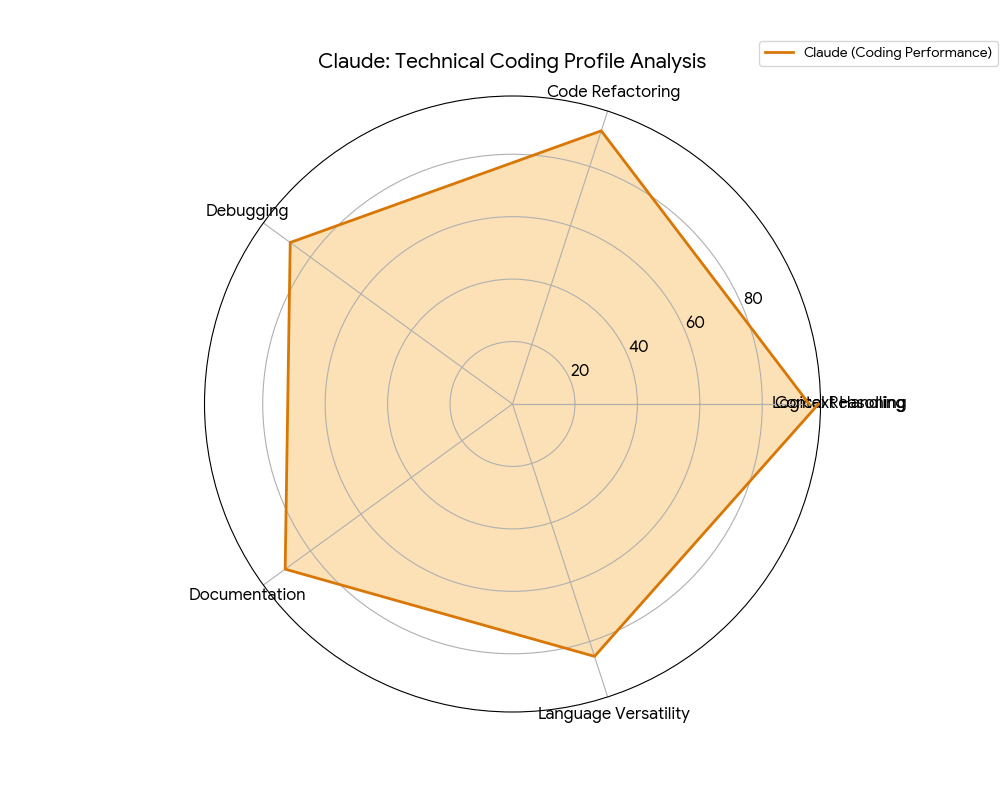
Claude 3.7 for coding is the tool I’d recommend to a developer who wants one AI coding assistant. Not because it’s dramatically better than everything else in every dimension. But because it’s better at the part that matters most: helping you think through problems.
Writing code is learnable. Debugging is learnable. Understanding syntax is just memorization.
But thinking clearly about architecture? Understanding the tradeoffs between approaches? Spotting the hidden assumptions that will become next month’s production incident? That’s harder, takes longer to learn, and has a much higher payoff.
That’s where Claude adds the most value.
My final advice:
- Define your data models before asking Claude to write anything
- Ask about assumptions, not just bugs
- Break large tasks into tiny, specific pieces
- Review everything with suspicion
- Use the context window but trim aggressively
- Never deploy code you don’t fully understand
Remember the three hours I spent hunting that misplaced bracket? I won’t spend them that way again.
The tool that saved me eleven seconds isn’t the point. The point is what I do with the three hours I got back. That’s where the value actually compounds.
Claude won’t make you a 10x developer overnight. But it will make you a more thoughtful one. And over time, that’s worth more than any magic trick.
Quick Reference: My Claude Coding Cheat Sheet
| Task Type | My Approach | Success Rate |
|---|---|---|
| Boilerplate (CRUD, migrations, tests) | “Write this following the pattern in [file]” | High |
| Unfamiliar library | “Walk me through the approach first, then we’ll write code” | Medium-High |
| Debugging | “What assumptions is this code making that might not hold?” | High |
| Code review (structural) | “What implicit dependencies or missing error handling do you see?” | Medium |
| Architecture decisions | Don’t use Claude (make those decisions yourself) | N/A |
| Security-critical code | Don’t use Claude (write it yourself) | N/A |
This guide is based on months of real-world use, not marketing materials. Your mileage may vary. Always test generated code thoroughly. And seriously, stop calling it “vibe coding.”

Independent technology writer focused on artificial intelligence, emerging technologies, and digital innovation. Covers AI applications in sports, productivity, and online business.