





































A Quick Confession Before We Start
Let me tell you something straight up – there’s no such thing as “the best AI.” I know that’s not the catchy answer you were hoping for, but stick with me. Choosing an AI in 2026 is like choosing food. You wouldn’t say pizza is “better” than sushi, right? It depends on what you’re hungry for.
The days when everyone just shouted “ChatGPT!” and that was the end of the conversation? Yeah, those days are long gone.
I’ve been testing these four AI giants (ChatGPT, Claude, Gemini, and DeepSeek) daily since late 2025. I paid with my own money, banged my head against their stupid mistakes, and celebrated their brilliant moments. And now I’m going to tell you exactly what I learned – no fancy marketing words, no confusing benchmarks that mean nothing in real life.
Just honest, practical advice from someone who actually uses these tools every single day.
Why One AI Just Isn’t Enough Anymore (And That’s Actually Great News)
Here’s the thing that surprised me the most: in 2026, each AI company has stopped trying to be “the best at everything.” Instead, they got smart. They each picked their own speciality and doubled down on it.
Think of it like this:
- OpenAI (ChatGPT) looked around and said, “We want to be the one tool you never need to leave.” So they added image generation, video, voice, a whole app store… they’re the all-in-one Swiss Army knife.
- Anthropic (Claude) went the opposite direction. They said, “Screw images and voices. We’re going to be so ridiculously good at understanding language and code that you won’t care about the other stuff.” And honestly? They pulled it off.
- Google (Gemini) looked at their massive advantage – the entire internet and your Gmail account – and built everything around that. Need to analyze a million pages of documents in one go? Gemini laughs at that. It’s a research beast.
- DeepSeek came out of nowhere (seriously, nobody saw them coming) and just asked: “Why does AI have to be so damn expensive?” They made their models open-source and 90% cheaper. Game changer for anyone watching their budget.
Once you understand these different personalities, picking the right tool becomes so much easier. You’re not looking for “the best” anymore. You’re looking for “the best for what I need right now.”
Meet the Four Contenders (Like You’re Having Coffee With a Friend)
Let me introduce you to each one like I’m describing four colleagues in my office. You’ll quickly see who you want to work with.
ChatGPT (GPT-5.4) – The Reliable All-Rounder
What it’s like working with ChatGPT? It’s that one colleague who can do literally everything – write emails, make presentations, generate images, even talk to you while you’re cooking dinner. Not always the most creative, but never useless.
What it absolutely nails:
- Everything-in-one convenience. Need an image? DALL-E is built right in. Voice chat? Yep. Web search? Got it. Video generation with Sora? Coming along nicely. One subscription, one interface, no jumping between tools.
- The GPT Store is a hidden gem. Seriously, don’t sleep on this. There are thousands of custom assistants people have already built. One for analyzing your bank statements. One for roleplaying job interviews. One for writing D&D campaigns. ChatGPT lets you borrow other people’s work.
- Reasoning mode for tough problems. The newer “Strawberry” or “o1” models (whatever they’re calling it this week) actually stop and think before answering. It’s slower, but for math problems or logic puzzles? Impressively good.
Where it trips up:
- The writing feels… corporate. You know that feeling when you read an email and think, “This was definitely written by HR”? That’s ChatGPT’s default tone. It’s polite, structured, and utterly soulless until you train it otherwise. You’ll find yourself saying “make this sound more human” a lot.
- Small memory window (128K tokens). That sounds technical, but here’s what it means: you can’t give it a whole book or a giant codebase at once. It’ll start forgetting the beginning before it reaches the end. Frustrating for big projects.
Bottom line – pick ChatGPT if: You want one tool, one subscription, and you’re okay with “good enough” results most of the time. Perfect for students, office workers, and anyone who wants AI help without thinking too hard about it.
Claude (Opus 4.6) – The Wordsmith Who Actually Gets You
What’s it like working with Claude? Okay, imagine you hire a really talented writer who just gets your voice. You give them a messy outline, and they hand you back something that sounds exactly like you wrote it – just better. That’s Claude. It’s my personal favorite for writing, and I’m not alone in this.
What it absolutely nails:
- The writing quality is genuinely different. I can’t fully explain why, but Claude’s text just flows. It varies sentence lengths, avoids corporate clichés, and picks up on your tone after just one or two examples. With ChatGPT, I spend forever editing. With Claude, I spend maybe ten minutes polishing and I’m done.
- Coding that makes developers cry happy tears. The SWE-bench numbers (think of it as a coding Olympics) consistently put Claude at the top. When I debug a messy backend error, Claude finds the root cause on the first try. Not just “here’s a fix” but “here’s WHY it broke and here’s how to prevent it next time.” Professional coding tools like Cursor and Windsurf literally built their products around Claude.
- Large memory (200K tokens) – not as huge as Gemini, but enough for a full novel or a medium-sized codebase. And unlike some others, Claude actually remembers what you told it at the beginning.
Where it trips up:
- No image generation. At all. Want a picture to go with your article? Tough luck. You have to either switch to another tool or ask Claude to write Python code that generates a chart. It works, but it’s clunky.
- No voice mode worth mentioning. If you want to brainstorm while driving or cooking, Claude can’t help you.
Bottom line – pick Claude if: You’re a writer, journalist, lawyer, or developer. Anyone whose daily work involves words or code where quality actually matters. The $20/month is a no-brainer if your income depends on good output.
Gemini (3.1 Pro) – The Researcher Who Reads Everything
What’s it like working with Gemini? Imagine a research assistant who can read every single document in your office – all at once – and then answer questions about them. That’s Gemini. It’s not the most creative writer, but my god, the memory on this thing is insane.
What it absolutely nails:
- The context window is a monster. 2 million tokens. Let me put that in human terms: you can upload the entire “Three-Body Problem” trilogy – all three books – and still have room left over. Or a whole company’s worth of legal contracts. Or a massive codebase. The others can’t even come close to this.
- Google Workspace integration is magic. If you live in Gmail, Google Docs, and Google Drive, Gemini works seamlessly across all of them. “Hey Gemini, grab that report from Drive, look at the latest email from Sarah about it, and draft a response in a new Doc” – and it just does it. No copying and pasting between tabs.
- Real-time search with actual citations. For anything recent or fact-checking, Gemini destroys the competition. It doesn’t guess or hallucinate. It goes out, finds sources, and shows you where the information came from. Huge for journalists, researchers, or anyone who needs correct information, not just plausible information.
Where it trips up:
- The writing is… fine, I guess? It’s not bad, but it’s not good either. It’s like reading a competent but boring student paper. The sentences are correct. The structure makes sense. But there’s no life, no rhythm, no personality. You’ll need to heavily edit anything creative.
- Less useful outside Google’s world. If you’re a Microsoft Office person or you live in Slack and Notion? Gemini feels clunky. It’s clearly built for the Google ecosystem first.
Bottom line – pick Gemini if: You’re a researcher, lawyer, analyst, or anyone who regularly drowns in massive documents. Also great if you’re already deep in Google’s world. For writing? Keep looking.
DeepSeek (V3.2 / R1) – The Budget Genius Who Plays by Different Rules
What’s it like working with DeepSeek? This one’s the wild card. DeepSeek came out of a Chinese AI lab in early 2025 and shocked everyone by being nearly as good as ChatGPT for about 10% of the cost. It’s like finding out that a no-name brand phone is 90% as good as the iPhone but costs $50 instead of $1000.
What it absolutely nails:
- The pricing is unbelievable. 90% cheaper than ChatGPT or Claude for API access. If you’re a developer building an app that makes thousands of AI calls per day, this difference is massive. We’re talking maybe $1,500/month vs $15,000/month. That’s real money.
- It’s open source. You can literally download the model and run it on your own servers, completely private, behind your own firewall. For hospitals handling patient data, or companies with trade secrets, this is huge. The others won’t let you do this.
- Math reasoning is genuinely top-tier. The R1 model (their “reasoning” version) actually beats ChatGPT and Claude on pure math olympiad problems. If you’re doing complex calculations, logic puzzles, or theorem proving, DeepSeek is surprisingly good.
Where it trips up:
- Limited multimedia. No image generation. Basic image reading. No voice. It’s a pure text model – very good at text, but nothing else.
- The censorship question. Let’s be real: DeepSeek is Chinese. The cloud version is subject to Chinese laws. That means topics like certain historical events or political discussions get… filtered. You won’t even know what you’re missing. If that bothers you, you can self-host (run it on your own computers), but that requires technical skills.
Bottom line – pick DeepSeek if: You’re a developer on a tight budget, a company that needs absolute data privacy (and has tech skills to self-host), or a student/researcher who just wants something free that works. For creative writing or multimedia? Not your best bet.
Real Tests, Real Results (Because Benchmarks Are Boring)
Let me tell you what actually happened when I used all four for the same tasks. No fancy charts. Just real life.
Test 1: Writing a Blog Post
I gave each AI the same messy outline about “why people procrastinate and how to stop.”
- ChatGPT: Gave me a clean, structured article. Very organized. But it sounded like a generic self-help blog. I had to rewrite about 20% to add personality.
- Claude: Nailed it on the first try. The tone was conversational, the examples felt real, and it actually made me laugh once. I changed maybe five words. This is why I use Claude for writing.
- Gemini: The information was accurate (because it searched the web), but the writing was dry. Very “textbook.” I’d need to rewrite at least half to make it engaging.
- DeepSeek: Fine. Just fine. Not great, not terrible. It got the job done, but nothing special.
Winner: Claude, by a mile
Test 2: Debugging a Messy Python API Error
I intentionally broke a Flask API endpoint and asked each AI to fix it.
- ChatGPT: Found the problem after 2-3 back-and-forth questions. Kept asking for clarification. Got there eventually.
- Claude: Found the root cause immediately. Didn’t just give me the fix – explained why the error happened and how to avoid similar bugs. Felt like pair programming with a senior dev.
- Gemini: Gave me a working fix but the explanation was shallow. Wouldn’t trust it for complex systems.
- DeepSeek: Surprisingly good. Almost as fast as ChatGPT, and at 10% of the cost. For quick fixes, this is great value.
Winner: Claude, but DeepSeek is the value champion
Test 3: Analyzing 50 Pages of a Legal Contract
- ChatGPT: Started losing thread around page 30. By page 45, it had forgotten key clauses from the beginning. Frustrating.
- Claude: Handled all 50 pages fine (200K context window is enough for this). Answered specific questions accurately. Could point me to exact sections.
- Gemini: This is what Gemini was built for. It swallowed all 50 pages like a snack. Let me ask cross-referencing questions that required remembering the whole document. “How does the indemnity clause in section 3 relate to the liability cap in section 12?” – answered perfectly.
- DeepSeek: Same problem as ChatGPT. Smaller context window means it starts forgetting.
Winner: Gemini, and it’s not even close
Test 4: Research on “Recent AI Trends in 2026”
- ChatGPT: Gave me a plausible-sounding summary based on its 2025 training data. Some guesses that sounded confident but were wrong.
- Claude: Politely refused, saying it didn’t have recent data. Honestly, I respect the honesty.
- Gemini: Went out, searched the web, came back with actual articles from last week, citations included. This is the only one I’d trust for current events.
- DeepSeek: Gave a reasonable answer but couldn’t consistently cite sources. Okay for general trends, not for fact-checking.
Winner: Gemini
Test 5: Generating Images for a Storyboard
- ChatGPT: Quick, easy, built-in DALL-E. Understood my iterative changes (“make the lighting warmer,” “add a cat in the background”). Seamless.
- Claude: “I can’t generate images.” That’s it.
- Gemini: Can generate images via Imagen 3, but the integration isn’t as smooth as ChatGPT. More steps, more waiting.
- DeepSeek: “I can’t generate images.”
Winner: ChatGPT, obviously
Quick Reference Table (Because You Have Things to Do)
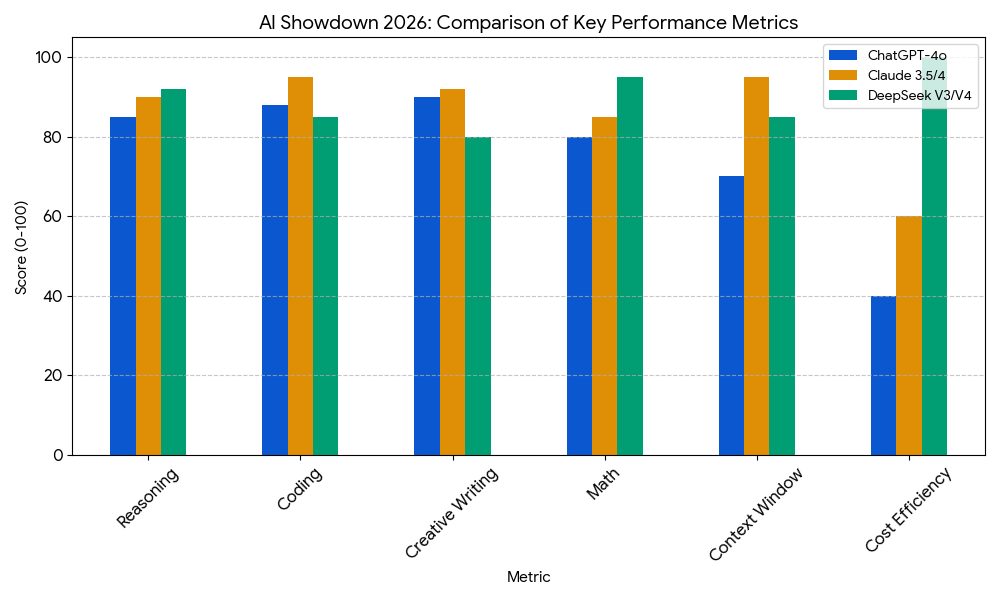
| Feature | ChatGPT | Claude | Gemini | DeepSeek |
|---|---|---|---|---|
| Writing quality | 8/10 (fine but generic) | 10/10 (natural, alive) | 6/10 (functional) | 7/10 (clear but dry) |
| Coding | 9/10 (excellent all-rounder) | 10/10 (pro-level) | 7/10 (fine) | 8.5/10 (amazing for price) |
| Memory window | 128K tokens | 200K tokens | 2000K (2M!) tokens | 128K tokens |
| Image generation | Yes (DALL-E built-in) | No | Yes (clunkier) | No |
| Voice mode | Yes | No | Yes | No |
| Ecosystem | 10/10 (GPT Store is huge) | 7/10 (dev-focused) | 8/10 (Google Workspace) | 5/10 (growing, open-source) |
| API cost (per 1M input) | $2.50 | $3.00 | ~$2.00 | $0.27 (90% cheaper!) |
| Privacy | Okay (opt-out options) | Very good (strong policies) | Mixed (Google logs data) | Cloud: weak / Self-hosted: total |
| Best for | All-rounder, multimedia, GPTs | Writing, coding, precision | Research, huge docs, Google users | High-volume tasks, math, privacy (self-hosted) |
How to Actually Build Your Own AI Toolkit (The Smart Way)
Here’s the secret that power users figured out in 2026: stop trying to pick one. Seriously. These aren’t rival sports teams you have to pledge loyalty to. They’re tools in a toolbox.
You need different tools for different jobs. A hammer is great for nails. Terrible for screws. Same thing here.
Let me give you three real-world examples of how people are combining these AIs:
Option A: The Writer & Content Creator
Monthly cost: ~$40 (ChatGPT + Claude)
My actual workflow when writing an article:
- Brainstorm ideas and do SEO research using Gemini (free version or via Google Workspace – it’s fine for this).
- Draft a quick, ugly first version with ChatGPT. I don’t care about quality here – just structure.
- Take that draft to Claude and say “make this sound like me, fix the flow, add personality.” This is where the magic happens.
- Generate images (cover, social media graphics) with DALL-E inside ChatGPT.
- Publish. Total time? About half of what it used to take me.
Why this works: ChatGPT gives me scaffolding. Claude gives me soul. $40/month saves me hours every week. Easy math.
Option B: The Developer
Monthly cost: ~$25-30 (Claude subscription + DeepSeek API pay-as-you-go)
My actual workflow for coding:
- Architecture and code reviews with Claude. Anything complex, anything where “getting it right” matters – I go to Claude first.
- Unit tests, boilerplate code, repetitive scripts – I route through DeepSeek’s API. It’s 90% cheaper and good enough for 90% of tasks.
- Use Cursor or VS Code with Claude API for real-time autocomplete. Feels like magic.
- For huge codebase questions (like “how does authentication flow through all 200 files?”), I sometimes drop into Gemini for its massive memory window.
Why this works: Claude does the thinking. DeepSeek does the volume. I spend maybe $30/month and feel like I have a junior dev on staff.
Option C: The Researcher / Analyst
Monthly cost: ~$20-25 (Gemini subscription + occasional Claude month)
My actual workflow for research projects:
- Ingest everything. All the PDFs, legal documents, academic papers. Gemini’s 2M token window means I dump them all in one go.
- Ask exploratory questions. “What themes appear across these 10 reports?” “Which contracts have indemnity clauses?” Gemini can cross-reference across the whole corpus.
- For writing the final report – I pay for one month of Claude and use it to polish the writing. Because Gemini’s writing is dry, remember?
- If I’m dealing with sensitive data (patient records, trade secrets), I spin up a self-hosted DeepSeek instance on my own servers. Takes some technical work, but worth it for privacy.
Why this works: You need Gemini’s memory for research. You need Claude’s writing for the final product. And sometimes you need DeepSeek’s privacy for sensitive stuff.
Real Talk: Lessons I Learned After Months of Daily Use
I wish someone had told me these things earlier. Let me save you the time.
1. Don’t Judge by the Free Tiers
Seriously. The free versions of these tools are like test-driving a Toyota Corolla and then assuming a Ferrari is also slow. They’re not the same models.
The free tier of ChatGPT is using an older, smaller model. The paid $20/month version is significantly smarter. Same for Claude – free Claude is Sonnet (good), paid Claude is Opus (excellent). Judge after you pay for at least one month.
2. The Best Prompt Isn’t a Prompt – It’s a Conversation
Here’s something that changed everything for me: don’t try to write the perfect prompt on the first try. Just start talking.
Tell the AI “here’s what I’m trying to do.” See what it gives you. Then say “that’s not quite right, try this instead.” Correct it. Refine it. The AI learns what you want during the conversation.
The people who complain “AI is useless” are usually the ones who type one sentence, get a bad result, and give up. Treat it like a junior colleague you’re training. Be patient. Give feedback.
3. Watch Out for “Polite Hallucinations”
Here’s a sneaky problem: ChatGPT and Claude really want to be helpful. Sometimes, they’ll make up an answer rather than say “I don’t know.”
It sounds confident. It sounds plausible. But it’s completely wrong.
Always, always, always fact-check important claims – especially with Gemini’s search feature or a regular Google search. Don’t trust any AI blindly. They’re brilliant, but they’re not truth machines.
4. Privacy Matters More Than You Think
This feels boring until it bites you.
If you’re pasting customer data, internal company strategy, or personal information into ChatGPT’s free web interface – that data might be used for training. Read the privacy policies.
Here’s my rule of thumb:
- Safe for any AI (cloud) : Public information, creative writing, general brainstorming.
- Be careful : Internal company documents, non-public strategy.
- Never put in cloud AI : Medical records, financial account numbers, passwords, legal privileged information.
For the really sensitive stuff, you need Claude (strong privacy policies) or DeepSeek self-hosted (you control the servers).
Frequently Asked Questions (From People Just Like You)
“Is it worth paying for all three?”
If AI is central to your work? Absolutely. $60/month ($20 x 3) is less than most freelancers bill for one hour of their time.
But you probably don’t need all three. Most people are fine with two:
- Writers/developers: Claude + ChatGPT
- Researchers: Gemini + Claude (occasionally)
- Budget-conscious: DeepSeek + free tier of whatever else
“Which one is best for coding?”
Claude, hands down. There’s a reason professional coding tools (Cursor, Windsurf) built their products around Claude’s API.
For simple scripts or boilerplate? Anything works. For genuinely hard problems where you need the right answer the first time? Claude.
“Which free tier is actually usable?”
Gemini’s free tier is the most generous. You can do real research, upload decent-sized documents.
ChatGPT’s free tier is fine for casual conversation and simple questions. Nothing serious.
Claude’s free tier is basically a “try before you buy” – you’ll hit limits fast. They want you to subscribe.
“What about Microsoft Copilot? Or Perplexity?”
Great question. This article focused on the four biggest standalone AIs, but:
- Microsoft Copilot is excellent if you live in Office/Teams/GitHub. It’s ChatGPT under the hood, but deeply integrated.
- Perplexity is great for research – kind of a blend of ChatGPT and Gemini search features. I use it sometimes as a backup.
But for most people, starting with ChatGPT + Claude covers 90% of what you need.
“Will one AI win everything by the end of 2026?”
Honestly? Probably not. And that’s a good thing.
The gap between these models has narrowed a lot, but each company has different strengths. The competition means all of them keep getting better, faster.
The “winner” depends entirely on what you’re trying to do. That’s not a cop-out answer – it’s just the truth of where the market is right now.
My Honest Conclusion (After Hundreds of Hours of Testing)
Here’s the uncomfortable truth that AI companies don’t want you to realize: there’s no “best” AI. There’s only the best AI for your specific work.
But let me make this simple for you:
- If you want one tool that does everything reasonably well – get ChatGPT. It’s the safest choice, the most versatile, and you won’t be disappointed.
- If you’re serious about writing or coding – get Claude. The quality difference is real, and you’ll notice it within the first hour of use. I certainly did.
- If you’re drowning in huge documents or doing serious research – get Gemini. That 2 million token context window is genuinely game-changing.
- If you’re on a tight budget or need complete data privacy – get DeepSeek. The price-to-performance ratio is unbelievable, and self-hosting is a superpower if you have the technical skills.
And if you can afford $40/month? Get two of them. Use Claude for writing and coding, ChatGPT for images and voice, Gemini for research. That’s not confusion – that’s being smart about using the right tool for each job.
The AI wars of 2026 have created something beautiful: a buyer’s market where we all win. The competition is fierce, the prices are reasonable, and the tools get better every month.
Whatever you choose, you’re living in a time when AI assistance is genuinely, practically useful. A few years ago, that seemed like science fiction. Now? It’s just another Tuesday.
Now go build something great. And if you have questions? You know where to find me.
P.S. – One last thought. The best AI is the one you actually use. Don’t get paralyzed by analysis. Pick one (I’d start with Claude if you write, ChatGPT if you’re unsure), pay for a month, and just… start. You’ll figure out what you’re missing pretty quickly. And that’s half the fun.

Independent technology writer focused on artificial intelligence, emerging technologies, and digital innovation. Covers AI applications in sports, productivity, and online business.